
Website Migration SEO Failures: The 5 Hidden Technical Mistakes That Kill Rankings (And How to Fix Them Before Launch)
Nine out of ten website migrations damage organic search traffic, yet properly executed migrations maintain 95–100% of pre-migration levels, according to Numen Technology's analysis of migration outcomes.
 Marcus Webb··10 min read
Website Migration SEO Failures: The 5 Hidden Technical Mistakes That Kill Rankings (And How to Fix Them Before Launch)
Nine out of ten website migrations damage organic search traffic, yet properly executed migrations maintain 95–100% of pre-migration levels, according to Numen Technology's analysis of migration outcomes. The gap between those two outcomes hinges on five specific technical SEO migration failures, each detectable through a pre-launch crawl audit with tools most teams already own.
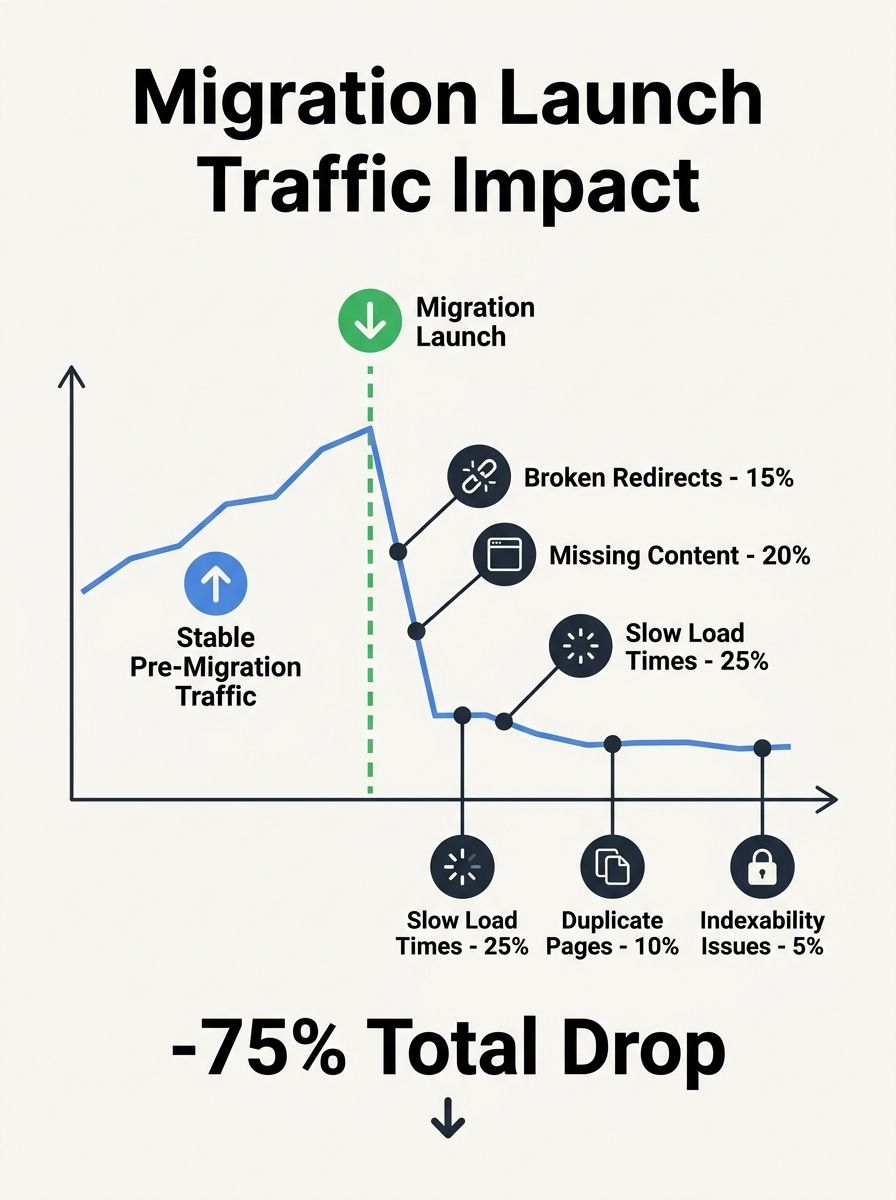
That 523-day recovery stat haunts me because I've watched it play out at agencies where I've consulted. A mid-size ecommerce company replatforms from Magento to Shopify, the dev team handles the migration as a pure engineering project, and six weeks later the SEO team is staring at a 40% traffic cliff with no clear diagnosis. The problem is almost never a single catastrophic mistake. It's a combination of the five issues below, each silently compounding the others.
The painful truth about migration traffic loss is that it's entirely preventable. The tools to catch these problems exist. The checklists exist. The failures happen because the technical SEO review gets compressed into the final 48 hours before launch, when nobody has time to fix anything substantial.
Staging Noindex Tags That Survive to Production
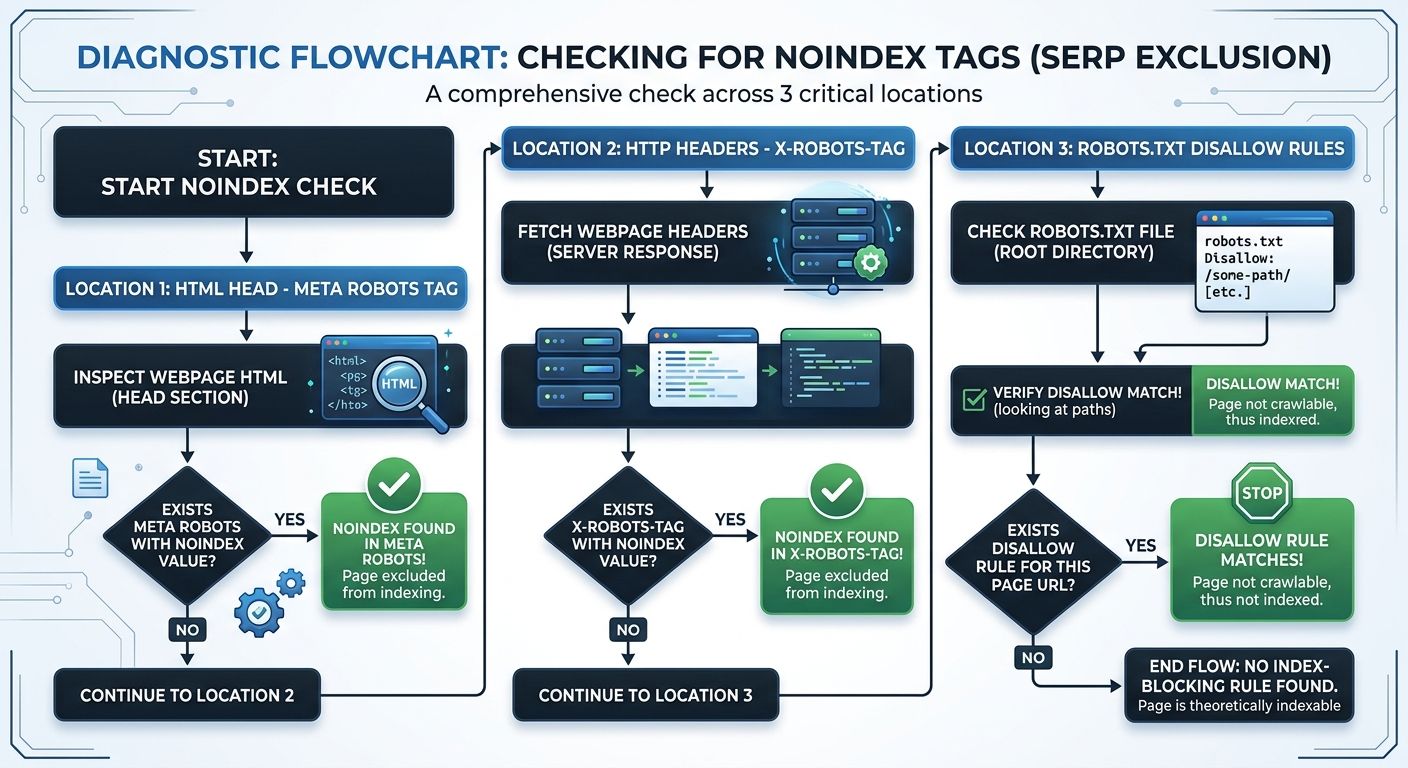
Crawlable hidden pages — pages that technically load but tell search engines to ignore them — are the single most destructive migration error because they're invisible to anyone who isn't specifically looking for them. The site looks perfect in a browser. Every page renders. Navigation works. And meanwhile, Google is systematically deindexing your entire domain.
This happens when staging environments use noindex meta tags or X-Robots-Tag headers to prevent Google from indexing test content, and those directives ship to the production site unchanged. As SearchX's analysis of noindex failures documents, "carrying over staging configurations to the production site" ranks among the most common migration disasters. Google's own documentation confirms that if a robots.txt file blocks the crawler from accessing a page, the crawler will never see the noindex rule, and the page might still appear in results if other pages link to it. But if the crawler can access the page and finds a noindex tag, it will drop that page from the index, usually within days.
Here's what makes this so insidious: the deindexing doesn't trigger any alarm in Google Search Console immediately. Coverage reports update on their own schedule. You might not see the "Excluded by 'noindex' tag" entries for a week or more after launch. By then, hundreds or thousands of pages have vanished from search results.
Detection method: Run a full crawl of the production domain with Screaming Frog or Sitebulb before launch. Filter for any page returning a noindex directive in either the meta robots tag or the X-Robots-Tag HTTP header. Check the robots.txt file for disallow rules targeting production content directories. This takes 20 minutes on a 5,000-page site and catches the problem with 100% reliability.
Why Blanket Redirects Destroy Page-Level Authority
The second-most-common technical SEO migration failure is redirecting all legacy URLs to the homepage instead of building a one-to-one 301 redirect map. Dev teams default to this shortcut when the old URL structure doesn't map cleanly to the new one, or when nobody has exported a complete list of indexed URLs before the migration begins.
As Americaneagle's migration guide puts it, properly managing 301 redirects is a must during any website migration, ensuring "users and search engines are directed correctly, preserving SEO and avoiding broken links." A blanket redirect violates this at every level. Google treats a redirect from a deep product page to the homepage as a soft 404, meaning the link equity that page accumulated over years evaporates. If you've ever done an audit looking for hidden technical problems, you know how much ranking power sits in pages that don't seem individually important but collectively carry significant authority.
The 301 redirect preservation process is tedious, which is exactly why it gets skipped. A 2,000-page site requires 2,000 individual redirect rules, each mapping an old URL to its closest equivalent on the new domain. And Semrush's redirect best practices make the scope even clearer: you should also update internal links that point to redirected URLs so they point directly to the replacement URL. That means your internal linking structure needs a full pass after the redirect map is built.
Detection method: Export all indexed URLs from Google Search Console's Pages report (filter to "Currently indexed"). Export all URLs from your old sitemap. Build a spreadsheet mapping each old URL to its new equivalent. Any old URL without a specific new destination needs a redirect to the closest topical match, not the homepage. Test 10% of your redirect map manually in a browser before launch, checking that the HTTP response code is 301 (not 302, not a JavaScript redirect).
Redirect Chains Compound With Every Migration
Redirect chains occur when URL A redirects to URL B, which then redirects to URL C. They're a natural byproduct of sites that have migrated before — from HTTP to HTTPS, from one CMS to another, from one domain to a rebrand. Each migration layers new redirects on top of old ones, and eventually you end up with chains three, four, or five hops deep.
The SEO impact of redirect chains during HTTPS migrations is well documented: "Even one missing redirect on a critical page — a category page, a popular blog post, or a product page — can cause noticeable ranking drops. Redirect chains occur when URL A redirects to URL B, which then redirects to URL C. This is common on sites that have gone through multiple migrations." Each hop in the chain dilutes the link equity passed to the final destination. Google has stated it will follow up to 10 redirects, but the practical reality is that chains longer than two hops lose measurable ranking signals.
If you're building SEO checks into your development workflow, redirect chain detection is one of the most valuable automated checks you can add. Every new redirect rule should be tested against the existing redirect map to confirm it doesn't create or extend a chain.
Detection method: Crawl the production site and filter for redirect chains (Screaming Frog flags these automatically under "Redirect Chains" in the response codes report). Any chain longer than one hop should be flattened so the original URL redirects directly to the final destination. Run this check against your old domain's redirect rules before adding any new migration redirects.
The Metadata Gap Between CMS Platforms
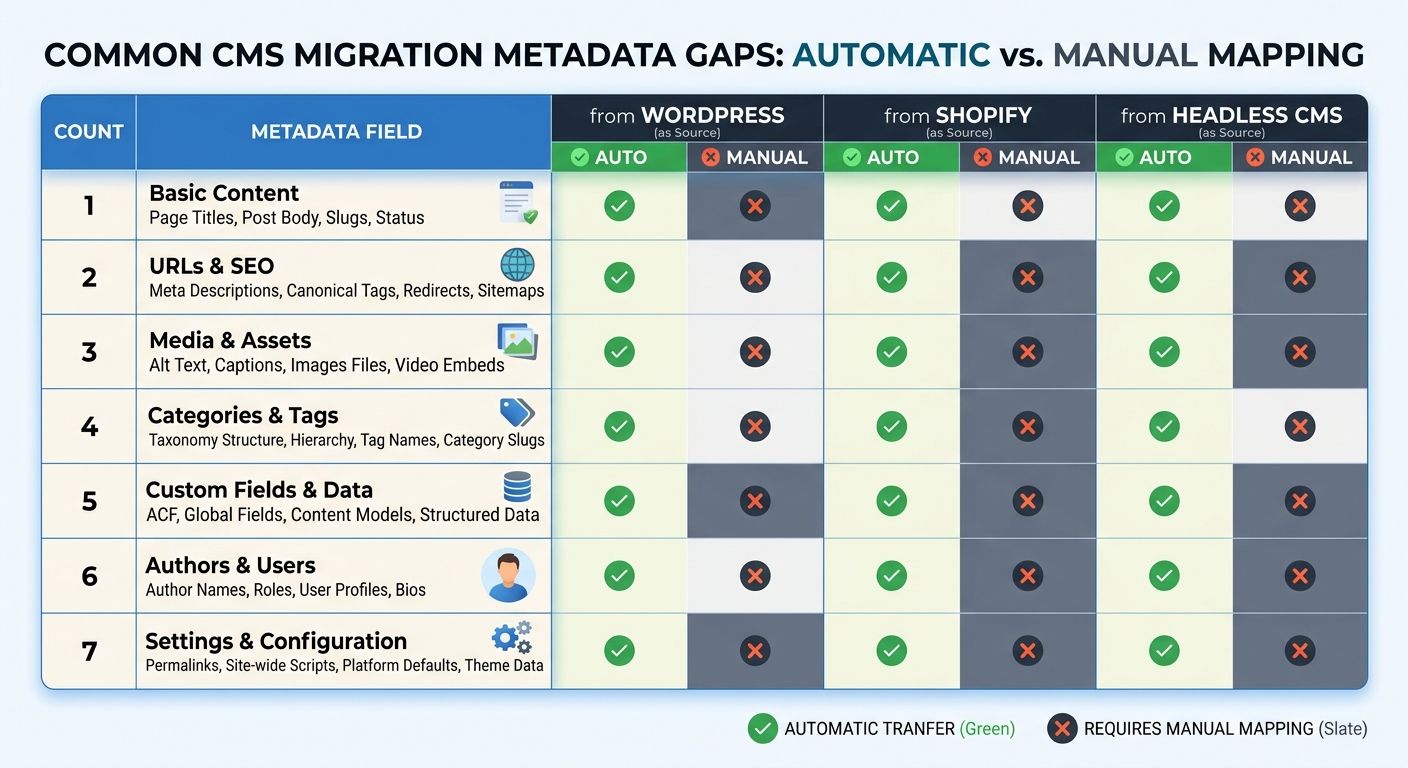
Page titles, meta descriptions, canonical tags, Open Graph tags, and schema markup don't automatically transfer when you move content between CMS platforms. This is obvious in theory and devastating in practice. A 2,000-page B2B site that migrates from WordPress to a headless CMS can lose optimized titles on 60% of its pages if the new platform's content model doesn't include fields for those elements, or if the export/import process strips them.
Numen Technology's migration analysis recommends "maintaining all structured data through migration" and emphasizes mapping metadata fields between platforms as a discrete project phase, not an afterthought. The crawlability and navigation problems documented by Zupo extend to structured data as well — if schema markup renders through a JavaScript template that the new CMS handles differently, crawlers may not see it at all.
Canonical tag errors deserve special attention. If your old site used self-referencing canonical tags (every page pointing to itself), and the new site either drops them or points them at the wrong URL, Google receives conflicting signals about which page is authoritative. I've seen this create duplicate content issues that took months to untangle because nobody checked canonical tag output during the staging review.
Metadata Element | WordPress → Shopify | WordPress → Headless CMS | Shopify → WordPress |
|---|---|---|---|
Page titles | Partial (products transfer, pages don't) | Manual mapping required | Manual mapping required |
Meta descriptions | Not transferred | Manual mapping required | Not transferred |
Canonical tags | Auto-generated (verify accuracy) | Must be configured in templates | Plugin-dependent |
Schema markup | Lost (plugin-dependent) | Must be rebuilt in templates | Must be rebuilt with plugins |
Open Graph tags | Not transferred | Manual mapping required | Plugin-dependent |
Hreflang tags | Not transferred | Must be configured in templates | Plugin-dependent |
Detection method: Export all metadata from the old site using Screaming Frog (page title, meta description, canonical, H1, schema type). After migration, run the same crawl on the new site and diff the two exports. Any page where the title, description, or canonical changed unexpectedly needs manual review. For structured data, use Google's Rich Results Test on your 20 highest-traffic pages to confirm schema renders correctly.
JavaScript Rendering Failures Hide Content From Crawlers
Modern migrations increasingly involve a shift to JavaScript-heavy frameworks or headless CMS architectures. React, Next.js, Vue, Nuxt — these tools produce fast, dynamic user experiences, but they can also produce pages where the actual content only appears after client-side JavaScript executes. If Google's renderer can't execute that JavaScript (or takes too long to do so), your content is invisible.
Embryo's analysis of migration errors highlights that running a site crawl to "identify all 404 pages, 500 server errors, and any other crawlability issues" should happen before launch on every migration. But standard crawl tools configured in their default mode may not catch JavaScript rendering problems because they don't execute JavaScript either. You need to crawl in JavaScript rendering mode, or compare the raw HTML source against the rendered DOM to spot content that exists only after JavaScript execution.
Core Web Vitals and crawl data take up to 28 days to stabilize post-launch, which means you won't see the full impact of rendering failures in Search Console for nearly a month. By that point, Google has already made indexing decisions based on what it could and couldn't render.
Server-side rendering (SSR) solves the problem for most sites. If your new platform supports SSR or static site generation, configure it to pre-render all content pages so the HTML delivered to crawlers contains the full page content without requiring JavaScript. This is a decision that needs to be made during the architecture phase of the migration, not discovered during the SEO review two days before launch.
Detection method: In Screaming Frog, enable JavaScript rendering and crawl your staging site. Compare the word count and content of each page in "HTML" mode versus "JavaScript" mode. Any page where the JavaScript-rendered version contains significantly more content than the raw HTML version has a rendering dependency that Google may or may not handle correctly. For your 50 highest-traffic pages, also test using Google's URL Inspection tool in Search Console (on the production site post-launch) to see exactly what Googlebot renders.
If you've been tracking hidden blockers that affect rankings, add JavaScript rendering dependencies to that list. They're among the hardest issues to diagnose after the fact because the pages look perfect to human visitors.

The Pre-Launch Migration Audit Checklist
Every mistake described above follows the same pattern: it's easy to detect with the right tool, it's cheap to fix before launch, and it's expensive and slow to fix after. Here's the specific audit sequence, in order of priority:
Noindex and robots check — Crawl the staging site. Filter for noindex in meta tags and HTTP headers. Check robots.txt for disallow rules. Fix any production-blocking directives. Time: 20 minutes.
301 redirect map validation — Compare your indexed URL list against the redirect map. Verify every old URL has a specific destination. Test a random 10% sample in a browser. Confirm 301 status codes (not 302s). Time: 2–4 hours for a 2,000-page site.
Redirect chain audit — Crawl the redirect map and flag any chains longer than one hop. Flatten all chains to direct redirects. Time: 1 hour.
Metadata diff — Export title, description, canonical, H1, and schema from both old and new sites. Compare the two exports. Fix any unintended changes. Time: 2–3 hours.
JavaScript rendering comparison — Crawl with JavaScript rendering enabled. Compare rendered content against raw HTML. Confirm all core content pages render without JavaScript dependency, or configure SSR. Time: 1–2 hours.
Total investment: 6–10 hours. Compare that against 523 days of recovery.
If you're evaluating whether your agency's audit process catches technical errors at this level, ask them specifically about their pre-migration protocol. An agency that can't describe their noindex checking process, redirect map validation method, and JavaScript rendering audit in concrete terms is an agency that will let these problems ship to production.
What Recovery Timelines Actually Look Like
The 90-day recovery window that gets cited in most migration guides represents the best-case scenario for well-executed migrations with minor issues. When one or more of the five failures above goes undetected, recovery extends dramatically. The 523-day average applies to sites where SEO wasn't prioritized during planning. And the 17% that never recover? Those are typically sites where blanket redirects destroyed page-level authority on hundreds of high-ranking URLs, and the competitive landscape shifted during the months of lost visibility.
Post-launch monitoring should focus on three data sources in this order: Google Search Console's Pages report (check for "Excluded by 'noindex' tag" and "Page with redirect" entries within the first 72 hours), server log analysis to confirm Googlebot is crawling the new URLs and following redirects correctly, and rank tracking for your top 50 revenue-generating keywords measured daily for the first 30 days. Core Web Vitals data takes up to 28 days to recalculate based on the new site's performance, so don't overreact to CWV scores during the first month.
The sites that maintain 95–100% of their traffic through a migration aren't lucky. They ran the audit. They caught the problems. They fixed them before anyone outside the team noticed. The window between staging completion and launch day is where migration outcomes are determined — and 6–10 hours of structured auditing is the entire difference between a 90-day stabilization and a multi-year recovery project that may never fully succeed.
Marcus Webb
Digital marketing consultant and agency review specialist. With 12 years in the SEO industry, Marcus has worked with agencies of all sizes and brings an insider perspective to agency evaluations and selection strategies.
Explore more topics