
How Google's Crawl Budget Allocation Actually Works for Large-Scale E-Commerce and Enterprise Sites
Googlebot decides how many of your pages it will crawl during each visit based on two competing variables: your server's capacity (crawl rate limit) and Google's own interest in your URLs (crawl demand).
 Marcus Webb··10 min read
How Google's Crawl Budget Allocation Actually Works for Large-Scale E-Commerce and Enterprise Sites
Googlebot decides how many of your pages it will crawl during each visit based on two competing variables: your server's capacity (crawl rate limit) and Google's own interest in your URLs (crawl demand). For sites with 500,000+ URLs, three distinct crawl budget optimization strategies compete for your engineering time: server performance tuning, URL architecture cleanup, and log-based crawl governance. Each solves different bottlenecks, and picking the wrong one wastes months.
The Two Variables Google Uses to Set Your Crawl Rate
Google's own crawl budget documentation defines the allocation as the intersection of crawl rate limit and crawl demand. Crawl rate limit is mechanical: how fast can your server respond before it starts throwing errors or slowing down? Crawl demand is editorial: how much does Google actually want those URLs based on popularity, freshness signals, and perceived quality?
The official Google stance is explicit: "Our goal is to crawl as many pages from your site as we can on each visit without overwhelming your server." That phrasing reveals the dynamic. Google will take everything your server can give. The ceiling is almost always on your end, not theirs.
For smaller sites (under 10,000 pages), this rarely matters. Googlebot can visit every URL in a single session. For enterprise e-commerce catalogs with 500,000 to 5 million product URLs, filterable facets, seasonal inventory changes, and multi-language variants, the math breaks down fast. Googlebot physically cannot visit every page on every crawl cycle, and the pages it skips might be your highest-margin products.
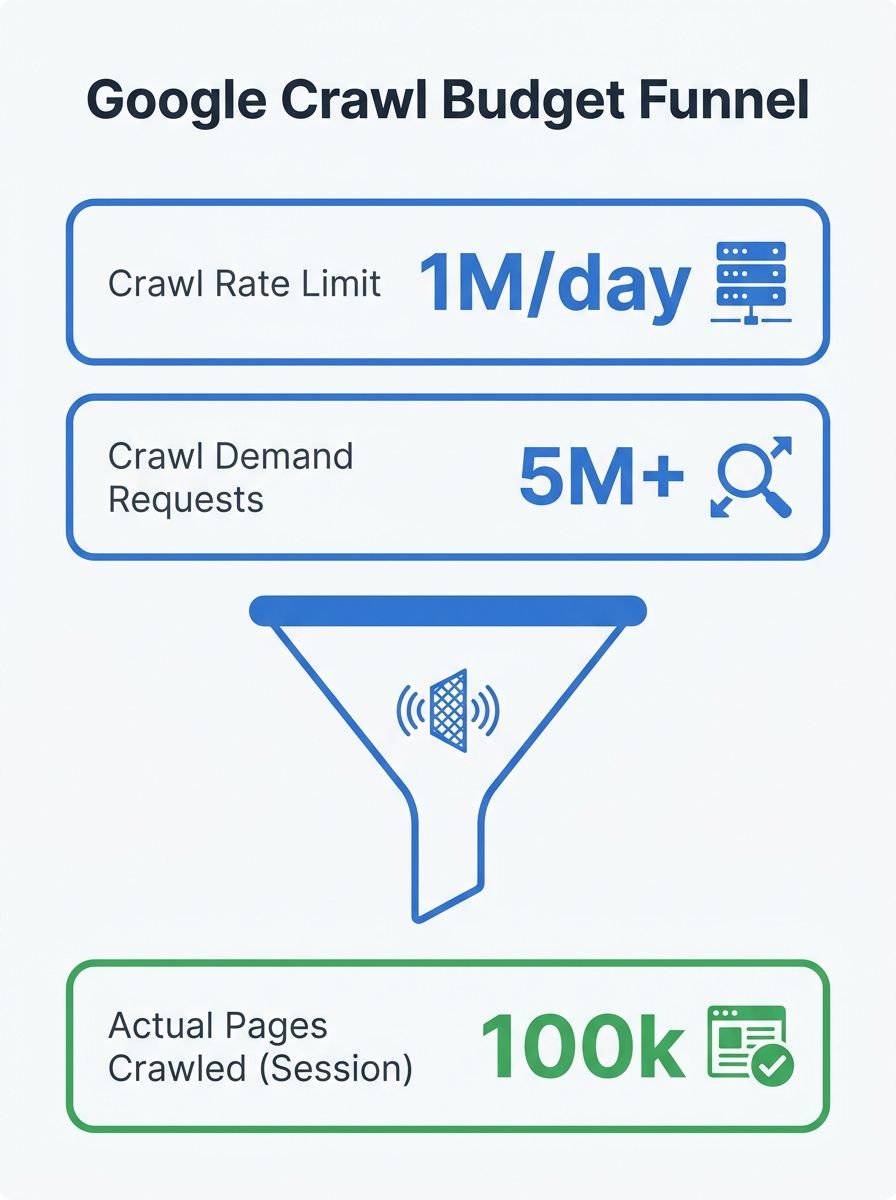
Go Fish Digital's enterprise crawl research frames the stakes clearly: crawl allocation "determines how quickly revenue assets enter the index, how frequently they refresh, and how reliably they remain visible during demand peaks." When your Black Friday landing pages take 21 days to get indexed instead of 4, crawl budget stops being a technical abstraction and becomes a revenue problem.
So which optimization approach do you prioritize? Three schools of thought dominate the enterprise crawl management conversation right now, and they address fundamentally different failure modes.
Fixing Server Response Time First
The server-first approach argues that Googlebot crawl frequency is bottlenecked by how fast your infrastructure responds, and everything else is secondary until Time to First Byte (TTFB) drops below 300-400ms. Google's Gary Illyes stated in May 2025 that database query speed is more critical than total page volume when it comes to crawl throughput. Slow SQL queries throttle crawling more aggressively than large static inventories.
The evidence for this approach is measurable. Improving server response time has been shown to multiply daily crawl rates by 4x in enterprise environments. If Googlebot requests a page and waits 1.2 seconds for a response, it will crawl fewer pages per session than if it gets responses in 200ms. The crawler is polite by design. It watches for latency spikes and backs off automatically.
Practical steps for server-first optimization:
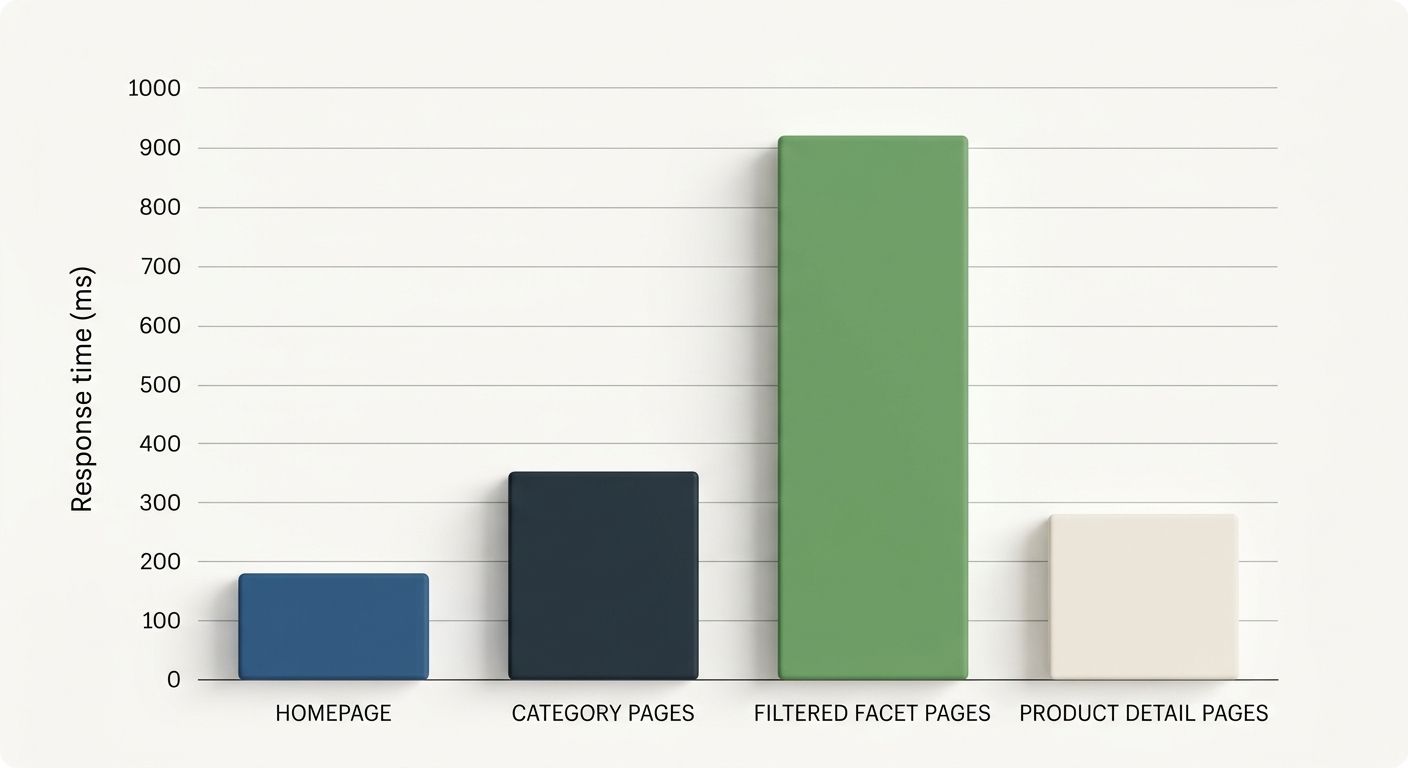
Measure TTFB across page templates, not just your homepage. Product detail pages, category pages, and filtered results pages often have wildly different response times because they hit different database queries.
Identify slow database queries behind your worst-performing templates. A product listing page that runs an unindexed JOIN across inventory, pricing, and review tables will choke crawl rates for your entire domain.
Add server resources where the Hostload exceeded error appears in Google Search Console's URL Inspection tool. Google's documentation explicitly recommends this when server capacity is the bottleneck.
Implement edge caching for pages that don't change hourly. Serving Googlebot a cached version of a category page that updates daily is perfectly fine and dramatically reduces server load.
When Server-First Falls Short
This approach assumes your server is the bottleneck. If your TTFB is already under 400ms and Googlebot still isn't reaching important pages, the problem is elsewhere. I've audited enterprise sites with excellent server performance where Googlebot spent 60%+ of its crawl budget on faceted navigation URLs that generated zero organic traffic. Fast servers just meant Googlebot crawled garbage faster.
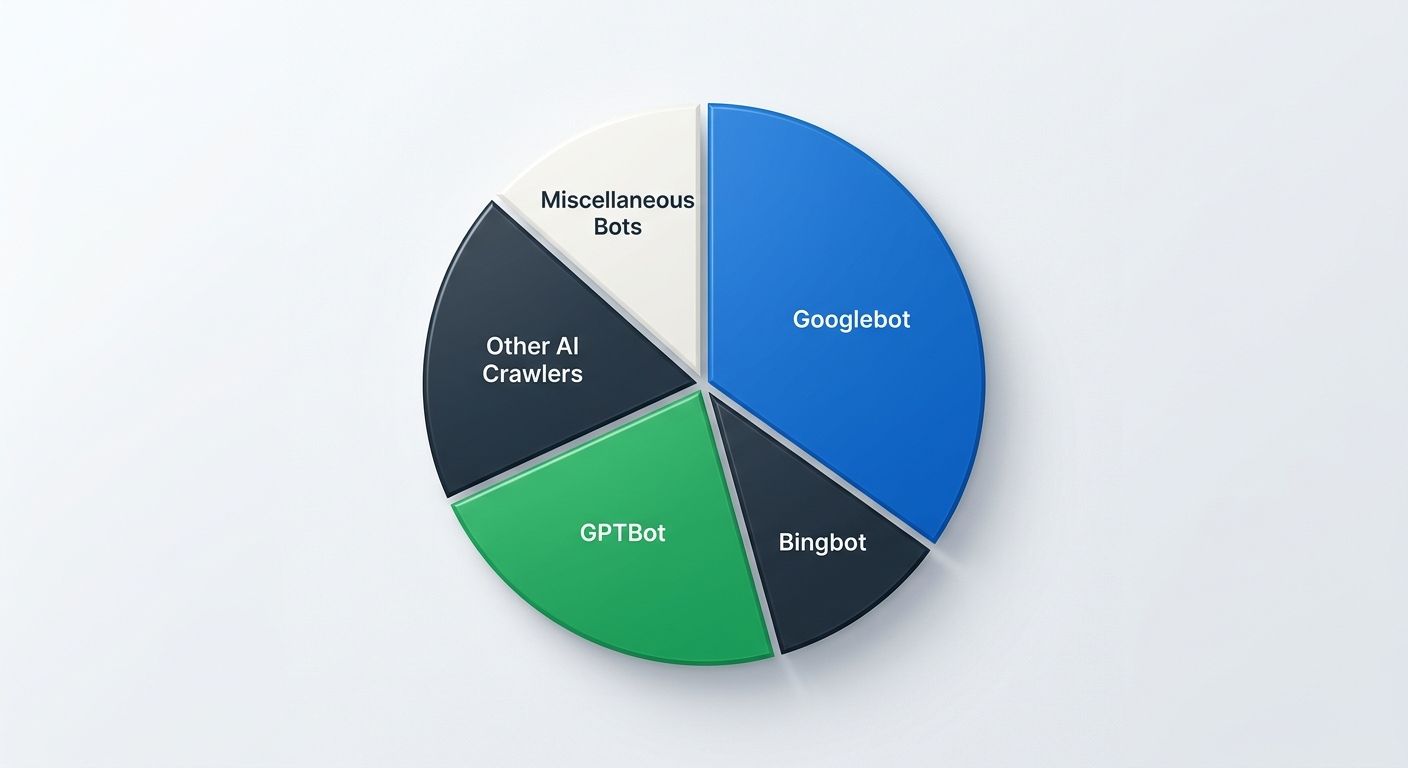
Server-first also does nothing to address the growing problem of AI crawler bandwidth consumption. Research indicates that AI crawlers like GPTBot can consume up to 40% of a site's total bot bandwidth, reducing the crawl capacity available to Googlebot even when your server has headroom. If you're seeing unexplained drops in Googlebot crawl frequency, retail SEO agencies and enterprise consultants are increasingly recommending bot taxonomy audits as a first diagnostic step.
Pruning URL Bloat and Faceted Navigation
The architecture-first approach focuses on large site indexation efficiency by eliminating URLs that shouldn't exist in Google's crawl queue at all. On a typical enterprise e-commerce site, the ratio of crawlable URLs to genuinely valuable, index-worthy URLs can be 10:1 or worse. Faceted navigation (color, size, brand, price range, sort order), session IDs, tracking parameters, and infinite scroll endpoints all generate crawlable URLs that dilute Googlebot's attention.
The concept of "zero-waste architecture" distinguishes between two categories. Anchor Facets are indexable, search-validated URL states where real search demand exists (e.g., "red running shoes women's size 8"). Ephemeral States are low-value combinations that no one searches for (e.g., sorting by "newest first" filtered by "ships in 3 days"). The strategy is to make Anchor Facets crawlable and prominent in internal linking while blocking Ephemeral States at the robots.txt level.
Why robots.txt instead of noindex? Because noindex still requires Googlebot to crawl the page, discover the tag, and process it. If you have 2 million faceted URLs with noindex tags, Googlebot still needs to visit all 2 million pages to learn they shouldn't be indexed. That burns crawl budget on exactly the URLs you're trying to deprioritize. Blocking via robots.txt prevents the crawl entirely. As SeoProfy's enterprise indexation research notes, the robots.txt file "helps prioritize resources and focus on high-value areas of the site."
Documented case studies show that eliminating crawl waste on duplicate and low-value URLs can reduce wasted Googlebot requests by 73%, compressing new product indexing time from 21 days to 4 days and increasing organic traffic by 58%. Those numbers come from enterprise environments with 1 million+ URLs where the majority of crawl budget was being consumed by non-revenue pages.
If your team is planning a site migration or major platform change, this approach pairs directly with architecture decisions that protect SEO during migrations. The URL cleanup done for crawl budget optimization serves double duty as migration prep.
When Architecture-First Falls Short
URL pruning works brilliantly when the site has obvious bloat. But on well-architected sites where faceted navigation is already properly managed, the gains plateau quickly. I've also seen teams spend 6+ months on URL cleanup projects that delivered marginal crawl improvements because the actual bottleneck was server performance or sitemap misconfiguration. You need diagnostic data before committing to this approach, which brings us to the third strategy.
Using Log File Analysis to Diagnose and Redirect Crawl Attention
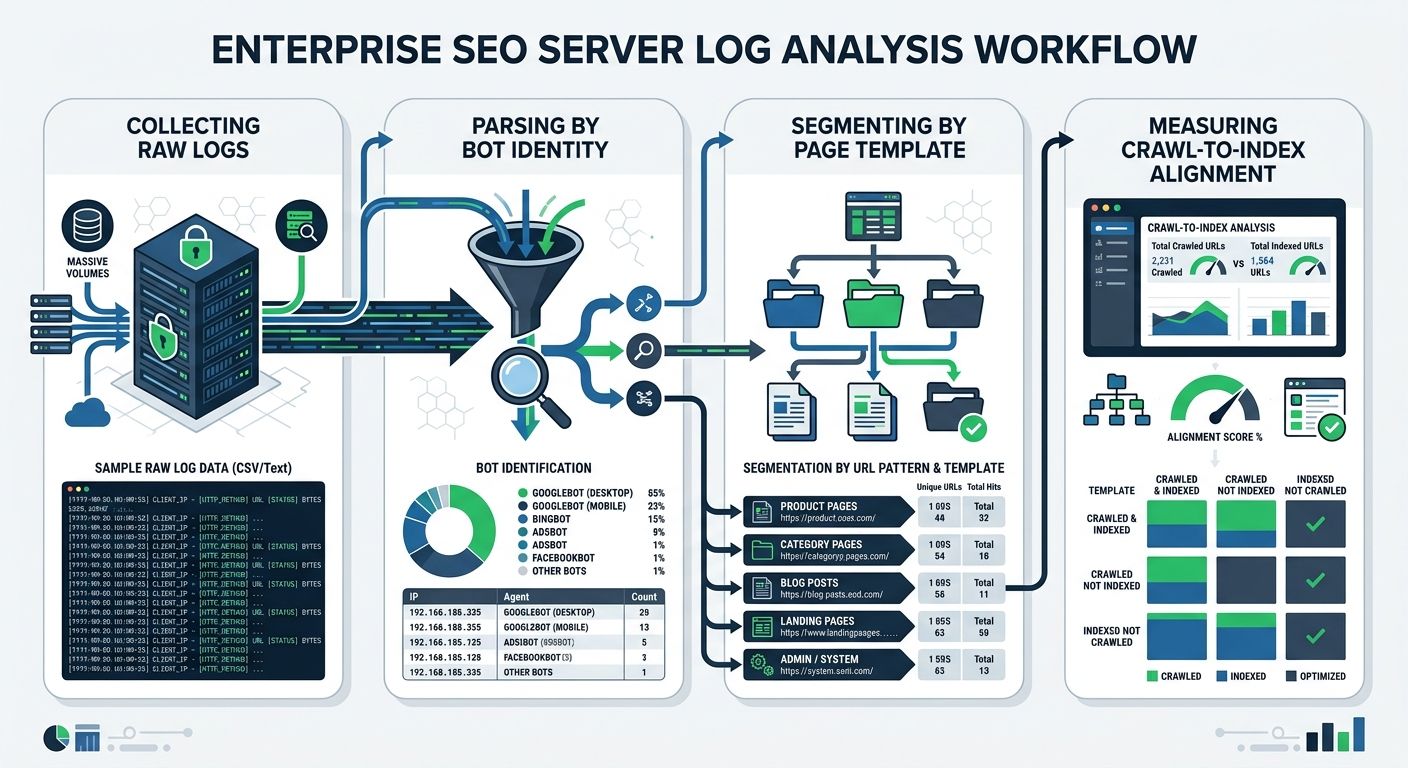
The monitoring-first approach says you shouldn't optimize anything until you know exactly what Googlebot is doing on your site right now. Log file analysis SEO gives you that visibility by parsing your server's raw access logs to identify which URLs Googlebot actually visits, how often, and what responses it receives.
Server logs reveal patterns that no other tool can surface. They show whether bots are still crawling legacy URLs months after a redesign, whether new product pages are being discovered within days or weeks, and whether redirect chains are consuming crawl cycles. As Search Engine Land's log analysis guide explains, "server logs become your early warning system" for crawl issues, revealing "if bots are still crawling legacy URLs, running into 404s, or ignoring newly launched content."
The monitoring-first approach typically involves:
Collecting and parsing raw access logs from your hosting provider or CDN. Understanding your server's log rotation schedule is important for retrieving historical crawl data and preserving information needed for long-term audits.
Segmenting crawl data by page template. If Googlebot hits your /search/ internal search results 40,000 times per month but your /product/ pages only get 12,000 visits, you've identified a major misallocation.
Verifying bot identity. Not all traffic claiming to be Googlebot is genuine. Server log analysis techniques include bot verification to "distinguish real Googlebot traffic from fake crawlers" that pollute your data.
Measuring crawl-to-index alignment. Track whether the pages Googlebot crawls most frequently are the pages that matter to your revenue. If there's a mismatch, you've found your optimization target.
The monitoring-first approach also feeds directly into sitemap governance. Rather than submitting one massive sitemap with every URL on your site, enterprise teams build segmented sitemap fleets organized by page template and priority tier. ALM Corp's enterprise SEO framework emphasizes that launch planning "should include sitemap strategy, internal linking, canonical validation, crawl path testing, and a check on whether the launch introduces new URL patterns that fragment crawl attention."
When Monitoring-First Falls Short
The obvious limitation is that log file analysis is diagnostic, not curative. It tells you what's broken but doesn't fix anything by itself. Teams that invest heavily in crawl monitoring dashboards without acting on the findings end up with expensive visibility into problems that persist indefinitely. If your organization has a pattern of generating SEO recommendations that never get implemented, adding more diagnostic data won't help until the implementation pipeline improves.
Log analysis also requires technical infrastructure that not every team has. Parsing millions of log entries daily, storing historical data, and building queryable dashboards demands engineering resources that compete with product development priorities. SEO companies for SaaS and tech firms tend to have stronger log analysis capabilities because their engineering cultures already value observability tooling.
Side-by-Side Comparison
Attribute | Server Performance Tuning | URL Architecture Cleanup | Log File Analysis & Governance |
|---|---|---|---|
Primary bottleneck addressed | Slow TTFB throttling crawl rate | URL bloat diluting crawl demand | Lack of visibility into actual crawl behavior |
Typical impact timeline | 2-4 weeks after deployment | 4-8 weeks for Googlebot to adjust | Immediate diagnostic value; fixes depend on what you find |
Engineering effort | Medium (infrastructure/DevOps) | High (requires cross-team coordination with product, UX) | Low to Medium (log pipeline setup, then ongoing analysis) |
Best for sites with | TTFB over 400ms on key templates | 10:1+ ratio of crawlable to index-worthy URLs | Unknown crawl patterns, post-migration uncertainty |
Documented crawl rate improvement | Up to 4x daily crawl rate increase | Up to 73% reduction in wasted crawl requests | Varies based on findings; enables targeted fixes |
AI crawler defense | Partial (faster servers serve all bots faster) | Partial (blocks low-value paths for all bots) | Strong (identifies AI crawler bandwidth consumption) |
Risk of wasted effort | Low if TTFB is genuinely the bottleneck | High if bloat isn't the real problem | Low (diagnostic work is rarely wasted) |
Where AI Crawlers Fit Into This Equation
One trend reshaping enterprise crawl management in 2026 is the bandwidth consumed by non-Google crawlers. GPTBot, ClaudeBot, and similar AI training crawlers can consume up to 40% of a site's total bot bandwidth. This directly reduces the server capacity available to Googlebot, which means your crawl rate limit drops even if you haven't changed anything about your infrastructure.
The practical response is implementing bot taxonomies and policy matrices in your robots.txt and server configuration. Decide which AI crawlers you want to allow, rate-limit the rest, and monitor the impact on Googlebot crawl frequency through log analysis. OnCrawl's research on Googlebot behavior and site health confirms that strengthening internal links to high-priority content and auditing for status code errors remain foundational, but bot governance is becoming the third pillar of crawl frequency management.
This is worth tracking alongside your broader enterprise SEO benchmarks. If Googlebot crawl frequency drops 30% over a quarter and you haven't made site changes, AI crawler traffic is the first suspect.
How To Choose Between These Three
The answer depends on which failure mode is actually killing your site's crawl efficiency, and you won't know that without data.
If your server response times exceed 400ms on product or category templates, start with server performance tuning. The potential 4x improvement in daily crawl rates makes this the highest-leverage fix when TTFB is the bottleneck. Check the URL Inspection tool in Search Console for "Hostload exceeded" errors as a quick diagnostic.
If your TTFB is healthy but you have hundreds of thousands of faceted, parameterized, or duplicate URLs that Googlebot keeps visiting, start with URL architecture cleanup. The 73% reduction in crawl waste documented in enterprise cases means Googlebot reallocates attention to revenue pages that were previously starved of crawl cycles.
If you genuinely don't know what Googlebot is doing on your site right now, start with log file analysis. It's the lowest-risk entry point because the diagnostic work informs every other decision. You might discover the problem is server speed. You might discover it's URL bloat. You might discover AI crawlers are consuming 40% of your bandwidth. Without log data, you're guessing, and enterprise crawl management is too expensive to guess at.
For most enterprise e-commerce sites with 500,000+ URLs, the realistic answer involves all three strategies deployed in sequence. Run log analysis first to identify the primary bottleneck. Fix the biggest problem (usually server speed or URL bloat). Then build ongoing crawl governance to catch regressions and monitor the AI crawler landscape as it continues to shift. The sites that treat crawl budget as a one-time optimization project instead of an ongoing discipline are the ones that keep showing up in my audits with the same indexation problems year after year.
Marcus Webb
Digital marketing consultant and agency review specialist. With 12 years in the SEO industry, Marcus has worked with agencies of all sizes and brings an insider perspective to agency evaluations and selection strategies.
Related Articles

The SEO Debugging Workflow: A Framework for Diagnosing Visibility Drops in Under 48 Hours
A five-layer diagnostic sequence (crawl, render, index, rank, click) applied in strict dependency order isolates the root cause of organic visibility drops faster than any other method I've tested across 200+ agency evaluations.

The Invisible SEO Audit: Fixing Hidden Technical Problems Before Rankings Improve
Fifty-six percent of companies now run AI-driven SEO monitoring to catch invisible technical problems in real time, according to 2026 marketing data.
Scaled AI Content Campaigns Face De-Indexation as Google's Crawl Budget Models Reject Mass-Production Strategies
Enterprise programmatic AI content initiatives are triggering manual penalties and de-indexation at scale as Google's crawl budget allocation models reject mass-produced pages that lack sustained user engagement signals, according to an analysis published by Search Engine Journal on July 14, 2026.
Explore more topics