
The SEO Debugging Workflow: A Framework for Diagnosing Visibility Drops in Under 48 Hours
A five-layer diagnostic sequence (crawl, render, index, rank, click) applied in strict dependency order isolates the root cause of organic visibility drops faster than any other method I've tested across 200+ agency evaluations.
 Marcus Webb··10 min read
The SEO Debugging Workflow: A Framework for Diagnosing Visibility Drops in Under 48 Hours
A five-layer diagnostic sequence (crawl, render, index, rank, click) applied in strict dependency order isolates the root cause of organic visibility drops faster than any other method I've tested across 200+ agency evaluations. When a site loses more than 15% of organic traffic within 48 hours of a code push or CMS update, the instinct is to rewrite content, disavow links, or fire off panicked emails to your agency. That's almost always the wrong first move. The problem is usually hiding in one of the first three layers: crawl access, rendering, or indexing. And each layer depends on the one below it, which is why sequence matters enormously.
I've seen agencies spend five-figure monthly retainers "optimizing content" for six weeks while a robots.txt misconfiguration silently blocked an entire product subdirectory from Googlebot. According to Search Engine Land's SEO debugging framework, smart debugging follows a repeatable process that systematically eliminates variables to isolate root causes instead of chasing red herrings. That's the principle this entire workflow is built on.
The significance of this approach extends beyond efficiency. A proper visibility drop diagnosis done within the first 48 hours prevents cascading damage. Content teams don't waste cycles rewriting pages that were never the problem. Dev teams don't roll back deployments that weren't the cause. And your agency doesn't get to hide behind vague "algorithm update" explanations when the real issue is a technical misfire they should have caught in monitoring.
Why Dependency Order Determines Recovery Speed
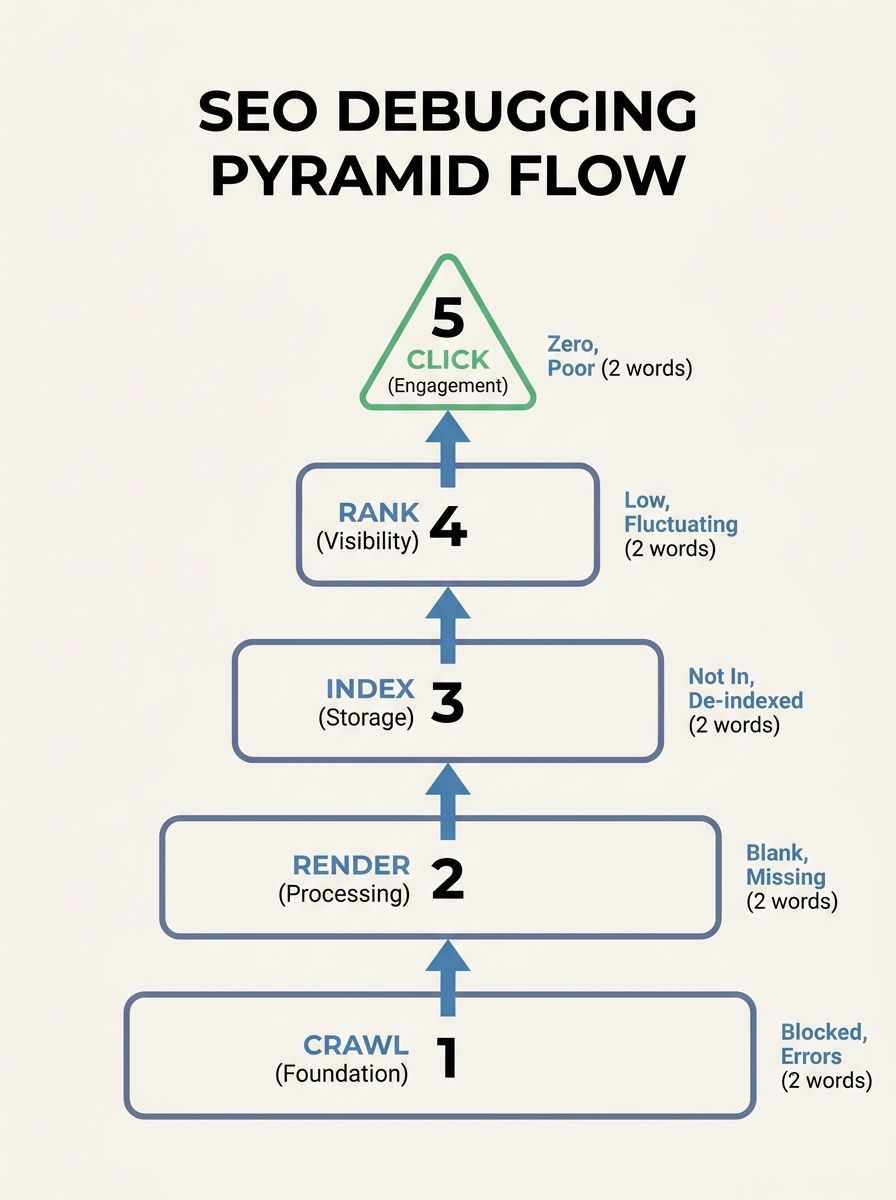
The SEO debugging pyramid exists because each visibility layer depends on the one beneath it. You can't rank what Google can't index. Google can't index what it can't render. And it can't render what it can't crawl. Sounds obvious when stated this plainly, but the majority of "SEO audits" I review from agencies jump straight to content quality and backlink profiles without confirming that the foundational layers are clean.
Here's the dependency chain:
Crawl: Can Googlebot (and AI crawlers) physically reach your pages?
Render: Once reached, can the crawler see the actual content on the page?
Index: After rendering, does Google choose to include the page in its index?
Rank: Among indexed pages, where does yours fall for target queries?
Click: Given your ranking position, are users actually choosing your result?
A problem at layer 1 makes layers 2 through 5 irrelevant. A problem at layer 3 makes investigating layers 4 and 5 a waste of time. This is why the Re:signal diagnostic process treats every investigation as a process of elimination, analyzing available data to confirm what isn't an issue before building a strategy to address the real problem.
When I evaluate agencies, one of my litmus tests is how they handle a client's traffic drop. If their first response involves keyword research or content calendar adjustments, that tells me they don't have a structured SEO debugging framework in place. If they start with crawl verification and work upward, they probably know what they're doing.
Crawl Access Is Where Most Invisible Failures Live
Your site crawl analysis should be the very first diagnostic step, every single time. Roughly 10% of websites carry active server errors that prevent Googlebot from reaching key pages, and the site owner often has no idea because the pages load fine in a regular browser.
Start with three checks:
Robots.txt verification. Pull up Google Search Console's robots.txt tester and check your critical URLs against the live file. A CaptainDNS case study documented a scenario where updating a robots.txt file with a broad Disallow directive blocked all English-language content under /en/ with no visible error in Search Console's main dashboard. The pages simply disappeared from the index over the following weeks. The fix was a one-line edit. The diagnosis took someone actually looking.
Server response codes. Crawl your top 50 revenue-driving URLs and check for 5xx errors, redirect chains longer than two hops, and soft 404s (pages returning 200 status codes but displaying error content). Your dev team's monitoring may confirm the server is "up," but Googlebot might be hitting rate limits or getting served different responses than human visitors.
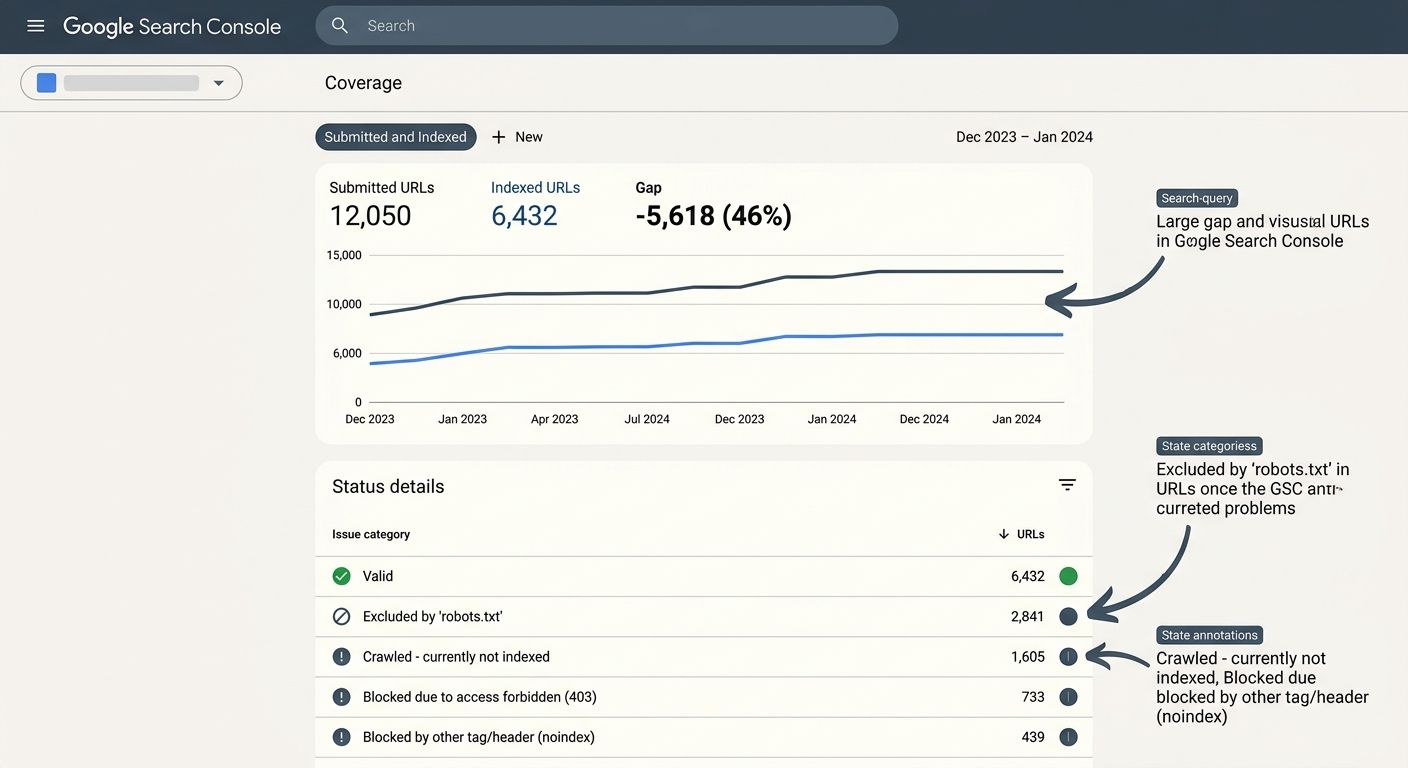
XML sitemap health. Compare the URLs in your submitted sitemaps against what Google reports as indexed in the Coverage report. A gap between "submitted" and "indexed" is one of the fastest signals that something is blocking crawl or indexing for specific URL patterns.
If you've recently restructured your site architecture, this layer becomes especially critical. I covered related ground in a piece about preparing site architecture for AI crawlers, and the same principles apply to traditional Googlebot access.
Rendering and Indexing Failures Hide in Plain Sight
Once you've confirmed crawl access is clean, move to layer 2: rendering. This is where JavaScript-heavy sites get bitten hardest. Googlebot can crawl a URL and receive an HTML response, but if the meaningful content is loaded via client-side JavaScript that fails to execute during Google's rendering pass, the indexed version of your page may be nearly empty.
The diagnostic tool here is Google Search Console's URL Inspection feature. For any page you suspect has rendering issues, inspect the live URL and compare the rendered HTML against what you see in a browser. Pay attention to:
Whether your main body content appears in the rendered HTML
Whether navigation elements load (broken nav means broken internal links)
Whether lazy-loaded images have proper fallback attributes
The DebugBear technical SEO checklist covers JavaScript rendering alongside crawling, indexing, and Core Web Vitals in a single reference document. It's one of the most practical resources I've found for teams that need to move quickly through these layers without missing steps.
Indexing Verification
After confirming content renders correctly, check indexing status. The most common indexing failures I see during agency evaluations are:
Accidental noindex tags deployed via CMS plugin updates or template changes
Canonical tag conflicts where a page points its canonical to a different URL (often a staging or development version)
Duplicate content consolidation where Google chose to index a different version of your content than you intended
Run a site:yourdomain.com/target-path query in Google to confirm the page appears. Then check the "Page indexing" report in GSC for any "Excluded" entries that match your important URLs. Filter by "Excluded by 'noindex' tag" and "Alternate page with proper canonical tag" specifically.
If your technical SEO troubleshooting workflow stops at "the page is indexed" without verifying render quality, you're leaving a significant blind spot. I've reviewed agency deliverables where indexed pages had 90% of their content invisible to Google because a JavaScript framework update broke server-side rendering, and the agency's "monthly audit" never caught it because they only checked indexing status, not render output.
Ranking and Click-Through Shifts After Algorithm Updates
Layers 4 and 5 are where most people want to start, and where this framework deliberately makes you wait. If you've confirmed that crawl, render, and index are all clean, then a visibility drop at the ranking or click-through layer points to either an algorithm change or a competitive shift.
Correlating with Algorithm Updates
Google's March 2026 core update, for example, reduced visibility for aggregator sites while boosting first-party brand content. If your traffic drop timeline aligns with a confirmed update, check whether the affected pages share characteristics that the update targeted.
For ranking-layer diagnosis, compare your GSC performance data across two dimensions:
Query-level: Which specific search terms lost impressions? A drop concentrated on a few high-volume queries suggests a competitive shift. A broad drop across dozens of queries points to a domain-level signal change.
Page-level: Which URLs lost rankings? If the drops cluster on one section of your site (e.g., /blog/ but not /products/), the issue may relate to content quality signals or E-E-A-T assessment for that content type.
Click-Through Rate Erosion
Stable rankings with declining clicks is a pattern that has become far more common since AI Overviews expanded across commercial queries. According to publisher data, AI Overviews contributed to traffic declines as high as 58% for some categories. If your impressions held steady but clicks dropped, look at the SERP layout for your target queries. An AI Overview pushing organic results below the fold will reduce CTR even if your ranking position hasn't changed at all.
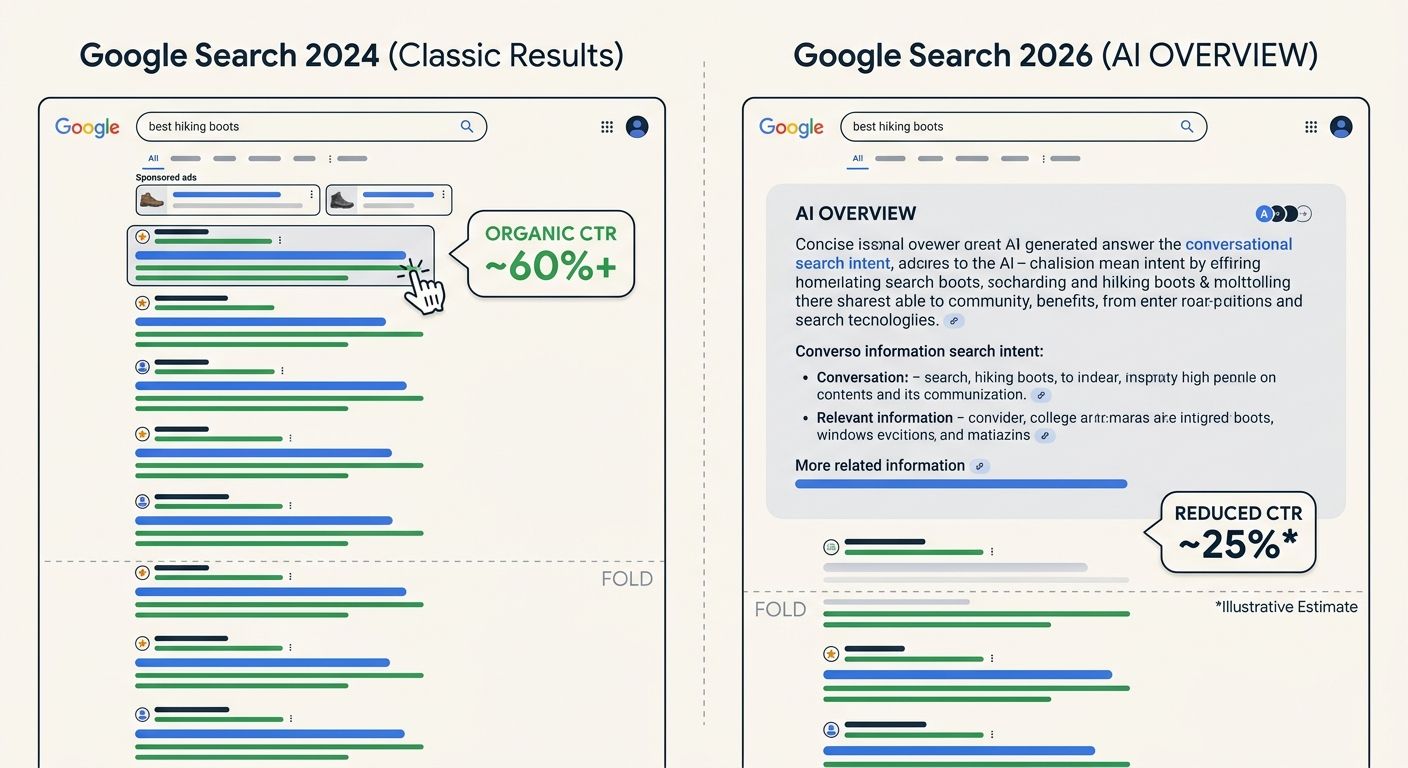
This distinction between ranking drops and CTR erosion matters because the response strategies are completely different. A ranking drop means you need to improve the page or fix a technical issue. CTR erosion from SERP layout changes means you need to evaluate whether that query is still worth targeting at all, or whether your strategy should shift toward AI search visibility as a parallel channel.
The 48-Hour Clock in Practice
Here's how the timeline breaks down when you're running this as a structured technical SEO troubleshooting workflow against a live traffic drop:
Hours 0-4: Confirm the drop is real. Compare the last 28 days of GSC data against the previous period. Check whether the decline affects impressions, clicks, or both. Verify that your analytics tracking code hasn't broken (you'd be surprised how often a GTM container update causes phantom traffic drops). Cross-reference GSC with server logs if available.
Hours 4-12: Correlate timing with site changes. Pull a changelog of every modification made to the site in the previous 72 hours. CMS updates, plugin changes, navigation edits, URL redirects, template modifications, content pruning, CDN configuration changes. Even minor internal linking changes can disrupt authority flow, as I outlined in a piece about mapping authority flow before an agency engagement.
Hours 12-24: Run layers 1-3. Crawl verification, render checking, and indexing confirmation for your top 20-30 revenue-driving pages. Don't try to audit the entire site at this stage. Focus on the pages that drive actual business outcomes. As Moz's debugging checklist emphasizes, the goal at this point is to avoid wasting time on unimportant technical rabbit holes.
Hours 24-48: Diagnose layers 4-5 if layers 1-3 are clean. Pull ranking data from your tracking tools, compare SERP layouts, and assess whether the drop correlates with a known algorithm update or competitive entry. Document every finding and every change you make. Gathering complete diagnostic data during this initial window is essential because you'll need it to validate whether your fixes are working over the following 30-60 days.
What This Framework Won't Catch
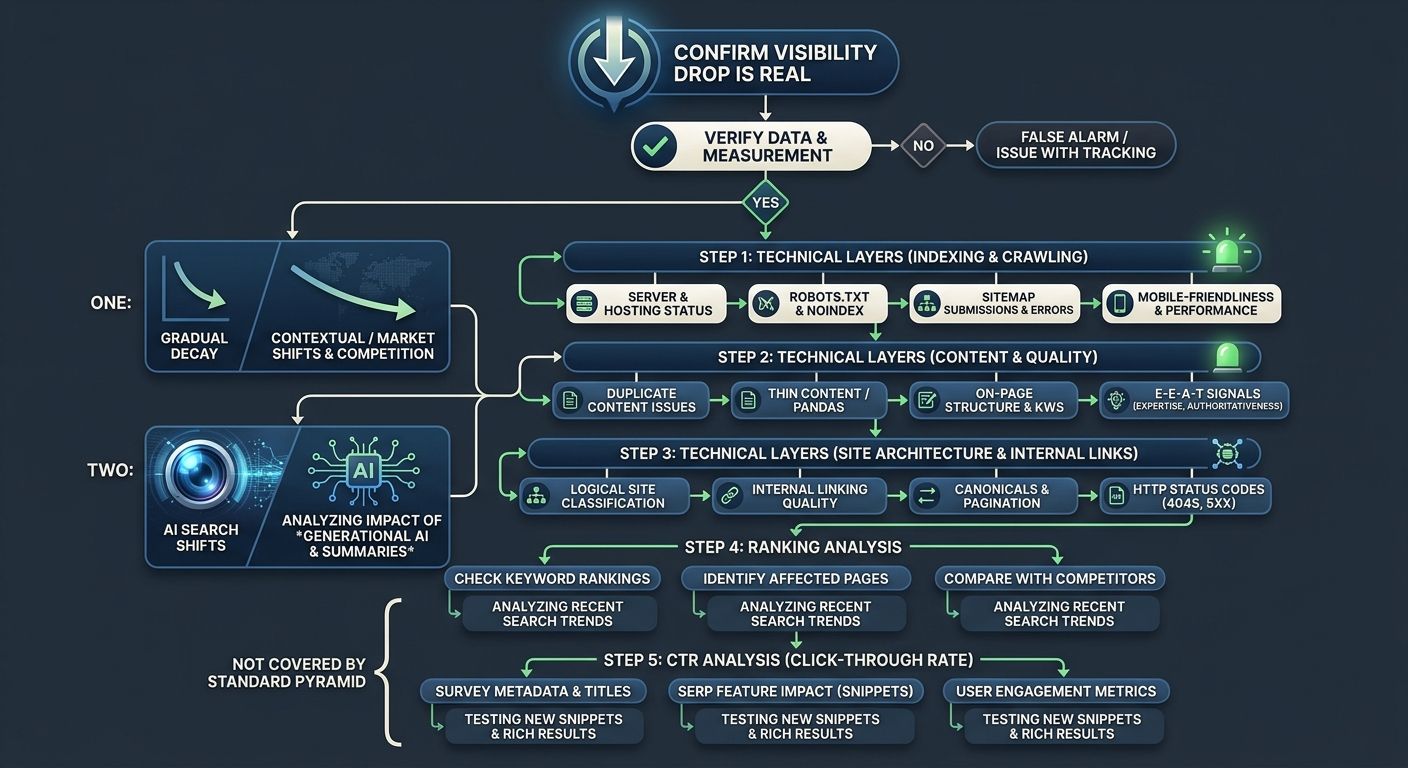
The five-layer pyramid handles the vast majority of sudden, diagnosable visibility drops. But there are categories of decline where this framework gives you a clean bill of health at every layer and the traffic still doesn't recover.
Gradual content decay doesn't trigger a sudden drop. If your competitor published a better resource six months ago and Google slowly shifted preference, layers 1-3 will be clean, layer 4 will show a slow position erosion (not a cliff), and the root cause is strategic rather than technical. This framework identifies the absence of technical problems, which is itself a useful finding because it tells you to look at content and competitive positioning instead.
Entity and brand authority shifts are harder to diagnose with traditional crawl-and-index tools. As AI-powered search continues to fragment the SEO landscape, visibility increasingly depends on whether AI systems recognize your brand as an authority for a topic. If you're seeing declines specifically in queries where AI Overviews appear, the diagnosis may point toward how AI search is reshaping what agencies need to deliver rather than toward a fixable technical problem.
Third-party dependency failures can also fall outside this framework's scope. If your CDN provider changed its caching behavior, or your CMS vendor pushed an update that altered schema markup output, the symptom looks like a technical SEO issue but the fix lies outside your direct control. This is where having reliable tooling and platform awareness becomes critical.
The Open Threads
This framework will continue to evolve as search engines change how they crawl, render, and surface content. A few areas remain genuinely unsettled.
The relationship between traditional Googlebot crawling and AI crawler behavior is still opaque. Server log analysis shows that AI crawlers from OpenAI, Anthropic, and others hit sites with different patterns and frequencies than Googlebot. Whether a page that's well-crawled by Googlebot but ignored by AI crawlers will lose visibility in AI-generated answers is something we're all still figuring out. The debugging pyramid may need a sixth layer for AI crawler accessibility sooner than expected.
The 48-hour window itself may be optimistic for sites that don't have proper monitoring in place. If you discover a traffic drop a week after it started because nobody was watching GSC, the diagnostic data is muddier and the correlation with specific site changes is harder to establish. Automated monitoring that flags anomalies within 24 hours is becoming table stakes, but many organizations (and their agencies) still rely on monthly reporting cycles that make rapid diagnosis impossible.
And the distinction between "technical problem" and "strategic problem" is getting blurrier. When an AI Overview absorbs the answer your page used to provide, is that a click-through-rate problem you can debug, or a fundamental shift in how search works? The framework helps you reach that question faster by eliminating technical causes first. What you do with the answer is a strategy conversation that no diagnostic checklist can resolve for you.
Marcus Webb
Digital marketing consultant and agency review specialist. With 12 years in the SEO industry, Marcus has worked with agencies of all sizes and brings an insider perspective to agency evaluations and selection strategies.
Related Articles

The SEO Debugging Pyramid: A Structured Framework for Diagnosing Traffic Drops Before They Become Crises
The SEO Debugging Pyramid is a five-layer diagnostic hierarchy (server infrastructure, crawl access, rendering and indexation, content signals, and authority/competitive visibility) that forces teams to troubleshoot organic traffic drops from the bottom up, preventing wasted effort on content rewrit
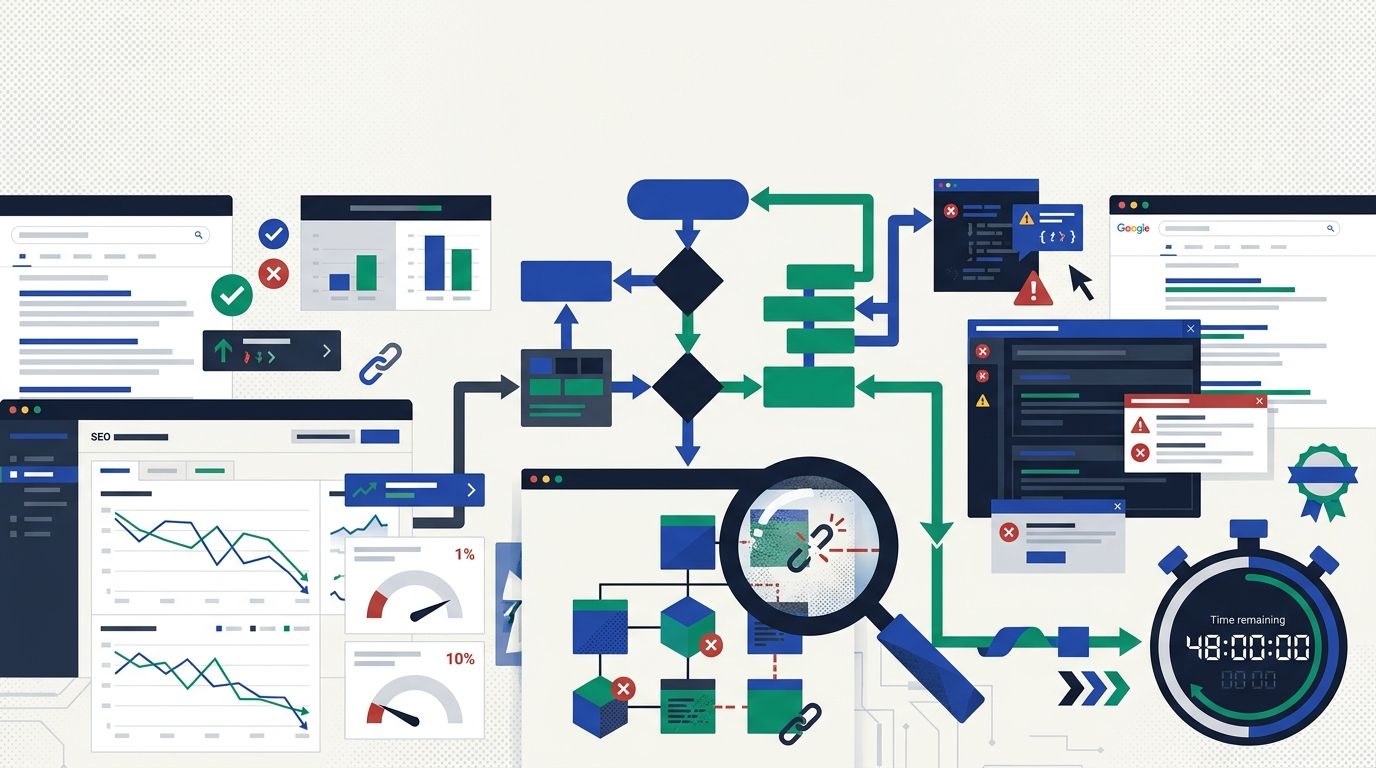
The SEO Debugging Workflow: A Production Engineering Framework for Diagnosing Ranking Drops in Under 48 Hours
Five categories of technical error — missing schema markup, meta tag gaps, internal linking deficiencies, Core Web Vitals failures, and crawl budget waste — account for 82% of ranking suppression events across websites.
The Invisible SEO Audit: Fixing Hidden Technical Problems Before Rankings Improve
Fifty-six percent of companies now run AI-driven SEO monitoring to catch invisible technical problems in real time, according to 2026 marketing data.
Explore more topics