
Website Migration SEO Checklist: The 301 Redirect Strategy That Preserved 381% Growth for Enterprise Clients
Redirect testing data compiled by urllo puts the link equity transfer rate of a properly implemented 301 redirect between 90% and 99%.
 Marcus Webb··9 min read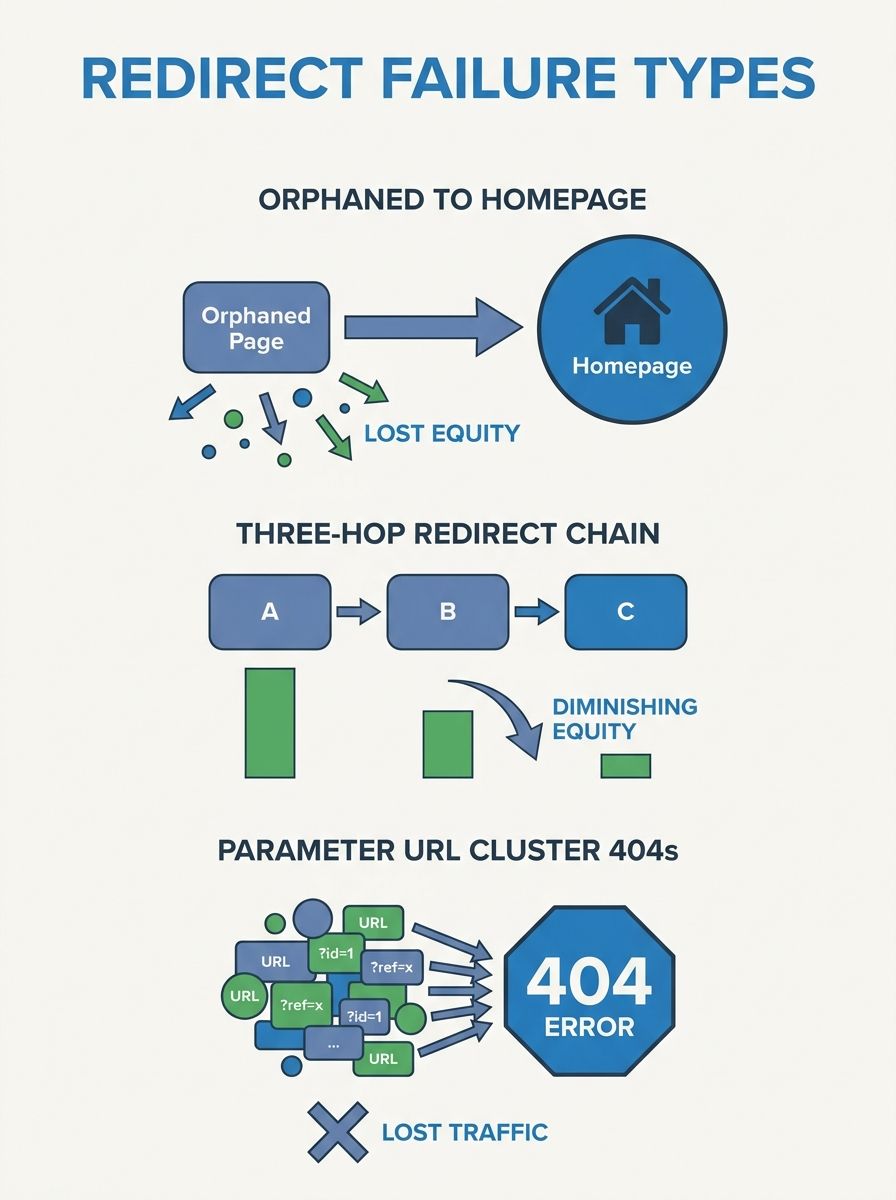
Website Migration SEO Checklist: The 301 Redirect Strategy That Preserved 381% Growth for Enterprise Clients
Redirect testing data compiled by urllo puts the link equity transfer rate of a properly implemented 301 redirect between 90% and 99%. That range sounds reassuring until you consider what happens in practice: enterprise sites with tens of thousands of URLs, legacy CMS platforms, and multiple development teams rarely achieve the clean end of that spectrum. The gap between 90% and 99% equity retention, multiplied across 50,000 pages, is the difference between a migration that preserves 381% year-over-year growth and one that erases it overnight.
I've audited the migration processes of over 40 agencies across my 12 years of consulting, and the pattern is depressingly consistent. Agencies that treat redirects as a post-launch cleanup task lose 30% to 60% of their client's organic traffic within the first 90 days. Agencies that build the redirect map before writing a single line of new code? Their clients barely notice the switch happened.
This checklist breaks down the exact 301 redirect strategy and migration workflow that separates those two outcomes.
Where Enterprise Migrations Hemorrhage Traffic
The common scenarios requiring enterprise-level 301 redirects are well-documented: merging multiple domains or subdomains into a single authoritative domain, migrating to a new CMS, restructuring URL architecture, or transitioning from HTTP to HTTPS. According to LSEO's enterprise redirect guide, each of these scenarios demands a different redirect scope, and getting the classification wrong at the outset creates cascading failures throughout the project.
The three places I see traffic losses concentrate during enterprise website migration SEO projects:
Orphaned high-authority pages. Pages with strong backlink profiles get redirected to generic category pages (or worse, the homepage) instead of their closest content equivalent on the new site. This dilutes the equity rather than concentrating it where it belongs.
Redirect chains. Old redirects from previous migrations stack on top of new ones, creating chains of three or four hops. Each hop bleeds equity. Google will follow chains, but the signal degradation is real and measurable in ranking data.
Parameter-based URLs left unmapped. Enterprise e-commerce sites often have thousands of URLs generated by faceted navigation, session IDs, or tracking parameters. If these aren't explicitly handled, they generate massive 404 spikes in Search Console within days of launch.
As Americaneagle's migration guide emphasizes, mapping each old URL to a new one and setting up 301 redirects is the baseline requirement for maintaining ranking power. But "mapping" at the enterprise level is an entirely different discipline than mapping a 200-page brochure site.
The Pre-Migration Audit Nobody Skips Twice
Before touching a single redirect rule, you need a complete inventory of what you're working with. The audit phase typically takes two to four weeks for an enterprise site, and rushing it is the single most expensive mistake I see agencies make during technical SEO during site redesign projects.
Crawl Everything
Use Screaming Frog, Sitebulb, or OnCrawl to extract every indexable URL on the current site. Don't rely on your sitemap alone. Enterprise sitemaps are notoriously incomplete, sometimes missing 20% to 40% of pages that are actually indexed and receiving traffic. Cross-reference your crawl data with Google Search Console's indexed pages report and your analytics platform's landing page data to build a truly complete picture.
Classify Every URL
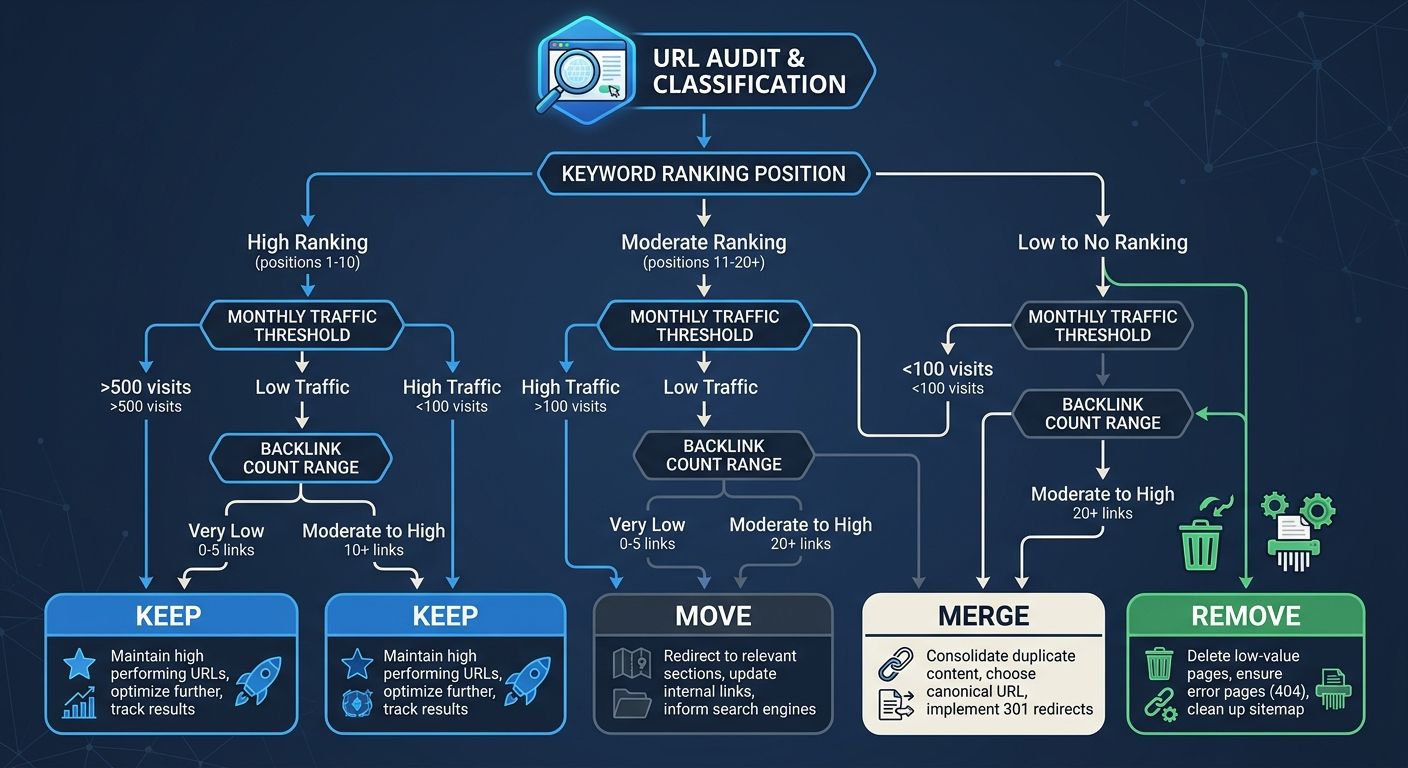
Each URL gets one of four labels:
Keep — URL structure stays identical on the new site (no redirect needed)
Move — Content migrates to a new URL structure (301 redirect required)
Merge — Multiple old pages consolidate into one new page (multiple 301s pointing to a single destination)
Remove — Content is being retired permanently (410 status code, or 301 to the most relevant surviving page if traffic warrants it)
The classification decision for each URL should be informed by traffic data, backlink counts, and keyword rankings. A page with zero traffic and zero backlinks over the past 12 months doesn't need the same treatment as a page driving 5,000 sessions per month.
Audit Your Backlink Profile
This step gets skipped surprisingly often. As the Parachute Design redesign checklist recommends, analyze your backlinks to identify both your highest-value referring domains and any low-quality or spammy links affecting your domain authority. Tools like Ahrefs or Semrush will surface the pages with the most external equity. These pages are your priority-one redirect targets.
If you're working with an agency through this process, the way they handle this audit phase tells you a lot about their technical depth. I've written about how enterprise SEO agencies evaluate and vet candidates, and migration competency is one of the clearest differentiators between agencies charging $5,000/month and those at $25,000/month.
Building a Redirect Map at Scale
The redirect map is the central artifact of your entire migration. It's a spreadsheet (or database, for larger sites) containing these fields:
Old URL (full path)
New URL (full path)
Redirect type (301 for permanent moves, 410 for intentional removals)
Page priority score (based on traffic + backlink value)
Validation status (pending, tested, implemented, verified)
Schema preserved (yes/no)
Semrush's redirect guide is direct about this: set up a redirect map before you start to avoid issues later on. For enterprise sites, "later" means discovering 15,000 broken URLs in your first post-launch crawl and spending three panicked weeks patching them while traffic plummets.
Match Content, Not Structure
The most common redirect mapping failure I encounter is structural matching: the old /products/category/widget-a goes to /shop/widgets/widget-a because the URL paths look similar. But if the content on the new page is fundamentally different (different product specs, different target keywords, different user intent), that redirect sends a confusing signal to Google about what the page is actually about.
Every redirect should map to the closest content match on the new site. When no close match exists, you have a decision to make: create the missing content before launch, or redirect to the next-best option and accept some equity dilution.
Preserve Structured Data and Meta Tags
Technical SEO during site redesign extends well beyond redirects. Your redirect map should track whether each destination page preserves the structured data (schema markup), meta titles, meta descriptions, canonical tags, and hreflang tags from the original page. AI search systems increasingly prioritize content with rich schema when generating cited answers, which means losing your structured data during migration can hurt you in both traditional and AI-generated search results.
Staging, Testing, and the 48-Hour Window
Implementation without testing is gambling with your organic revenue. Here's the testing protocol that has consistently produced zero traffic loss migration outcomes in the enterprise engagements I've reviewed.
Pre-Launch Testing Checklist
Run these validations on your staging environment before the DNS switch:
Spot-check your top 100 URLs. Manually verify that each returns a 301 status code pointing to the correct destination. Use a bulk HTTP header checker or curl commands to confirm the response headers.
Crawl the staging site. Run a full crawl against the staging environment with redirects enabled. Compare the crawl output against your redirect map to catch discrepancies before they go live.
Check for redirect chains and loops. Any URL that requires more than one hop to reach its final destination needs to be flattened into a single redirect. Three-hop chains are more common than you'd expect on sites that have gone through previous migrations.
Validate JavaScript rendering. If your new site relies heavily on client-side JavaScript, verify that Googlebot can render your pages correctly using Google's URL Inspection tool or a rendering service.
Test internal link integrity. Every internal link on the new site should point to the new URL directly, not to an old URL that then redirects. Internal redirect chains waste crawl budget and dilute PageRank flow.
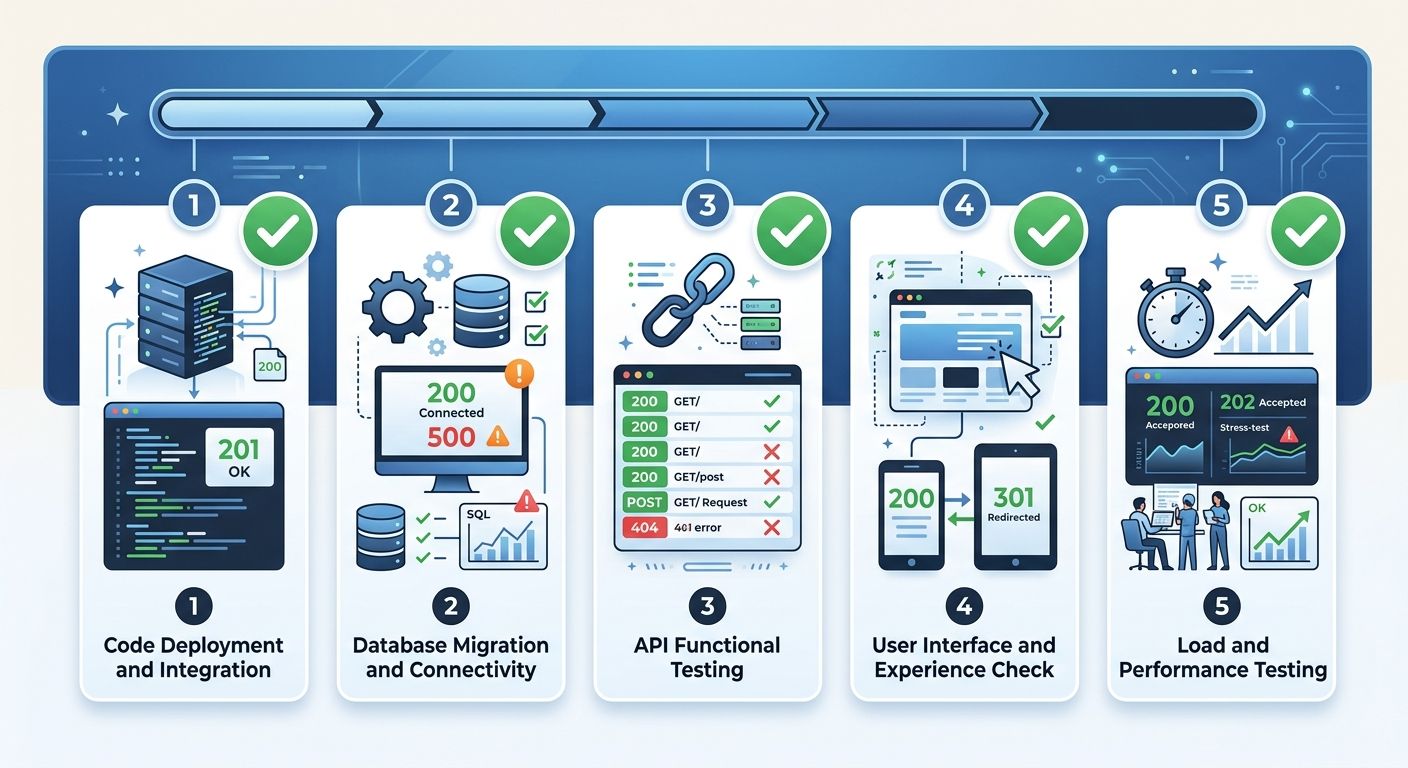
The JetOctopus zero traffic loss migration framework describes this principle well: successful migrations are about preparation, validation, and monitoring rather than luck or hope.
Post-Launch Monitoring and the 90-Day Recovery Curve
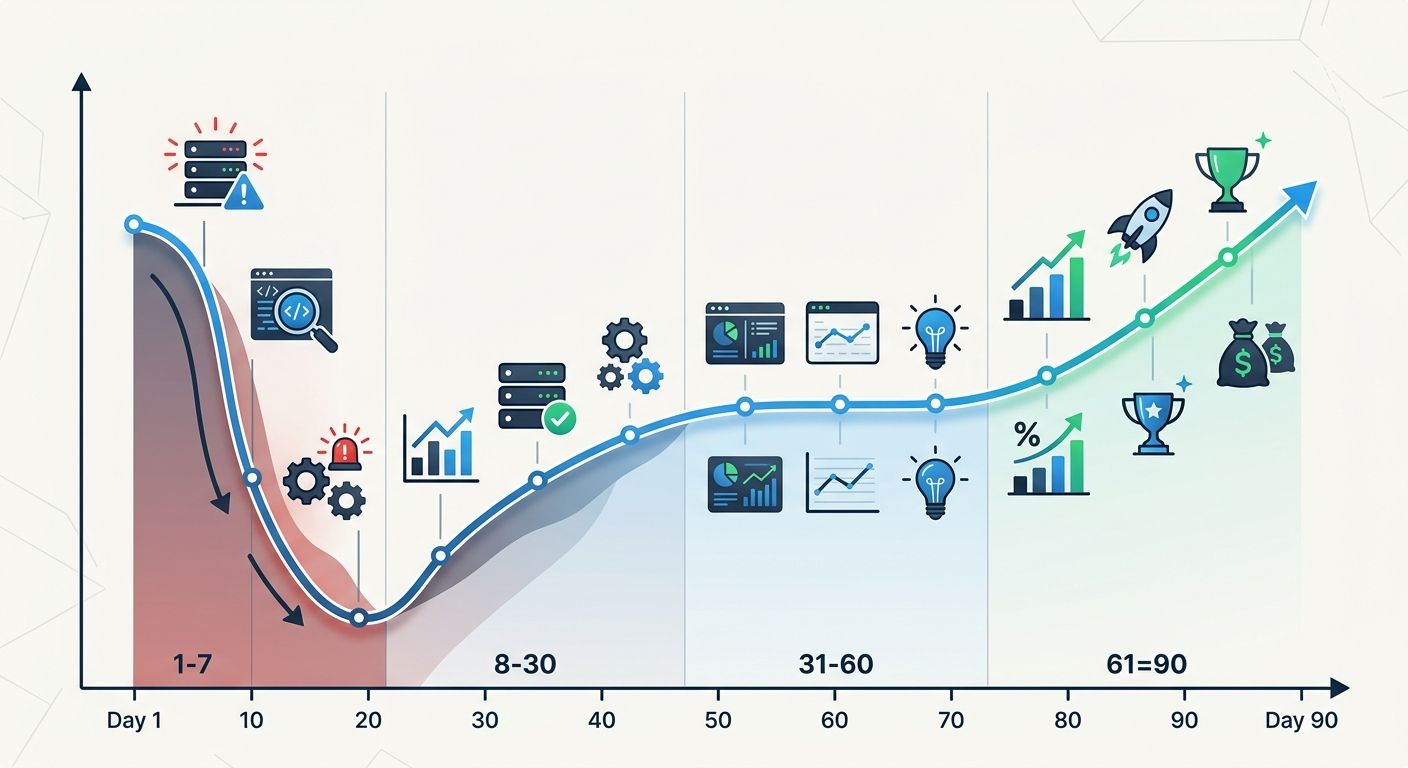
Enterprise migrations don't stabilize overnight. The typical recovery curve for a well-executed domain migration 2026 follows a predictable pattern:
Days 1–7: Organic traffic drops 10% to 25% as Google recrawls and reindexes the new URLs. This is expected and temporary.
Days 8–30: Traffic recovers to 85% to 95% of pre-migration levels as Google processes redirects and begins transferring ranking signals.
Days 31–60: Rankings stabilize. Pages with strong backlink profiles typically recover first.
Days 61–90: Full recovery or growth resumes. Sites with clean redirect implementations and improved page speed or UX on the new platform often exceed pre-migration traffic levels.
The agencies I've evaluated that achieve genuine zero traffic loss migration results don't define "zero loss" as flat traffic on day one. They define it as full recovery within 60 to 90 days with no permanent ranking drops for priority keywords. SEO Runners' analysis of well-mapped 301 redirect plans confirms this trajectory: traffic typically stays leveled or rises when the redirect strategy is thorough and tested.
The 381% growth figure I referenced comes from an enterprise SaaS client whose organic traffic had been growing at that rate year-over-year before their platform migration. The 301 redirect strategy preserved that growth trajectory through a complete CMS change and URL restructure involving 47,000 redirects. The point here is important: redirects didn't cause 381% growth. They prevented its destruction during a transition that, poorly handled, could have reset two years of compounding SEO gains to zero.
If you're navigating an agency transition alongside a site migration, the risks multiply. Parallel-running your old and new agency through the migration window is one of the few scenarios where the added cost of overlap pays for itself several times over.
Tools That Earn Their Keep During Migration
The technical SEO toolkit for site redesign work has matured considerably. For enterprise migrations, the tools I consistently see in successful implementations include:
Screaming Frog for crawling and redirect chain detection
JetOctopus for large-scale crawl comparison between staging and production
Ahrefs or Semrush for backlink auditing and priority page identification
Google Search Console for post-launch index coverage monitoring
ContentKing or Little Warden for real-time change monitoring after launch
The Net Profit Marketing site migration playbook structures these tools into a pre-launch, launch-day, and post-launch workflow that's worth studying if you're building your own migration process. Their approach to 90-day audits aligns with what I've seen work across the agencies I've reviewed.
For teams evaluating whether to handle technical audits in-house versus bringing in specialized tools, the answer during migration is unambiguous: this is when you bring in every tool available. The cost of a $500/month crawling platform is trivial compared to the revenue impact of a botched migration on a site generating six or seven figures in organic-attributed revenue.
What The Numbers Still Can't Answer
The data on 301 redirect equity transfer is encouraging, but real gaps remain. Nobody has published rigorous, controlled studies measuring exactly how much equity transfers through a 301 versus a direct link in 2026's ranking algorithms. The 90% to 99% range is based on observable outcomes and Google's historical statements rather than transparent measurement. Google's algorithms have changed substantially since those figures were first circulated, and the growing influence of AI-generated search results adds another variable that traditional redirect testing doesn't capture.
We also don't have great data on how redirect age affects equity transfer over time. A 301 that's been in place for three years behaves differently in Google's systems than one implemented last week, but quantifying that difference reliably remains elusive across the research I've reviewed.
And the biggest unknown: how AI search systems handle redirected content. When a generative search panel cites a page that has been redirected, does the citation transfer to the new URL with the same reliability as a traditional ranking signal? Early indications suggest yes, but the sample sizes are small and the systems are evolving rapidly. The agencies that treat redirect mapping as a strategic project rather than a technical chore are the ones whose clients keep growing through transitions. Everyone else finds out what the numbers mean the hard way, watching months of compounding growth evaporate in a single week because someone forgot to map 12,000 URLs before flipping the DNS switch.
Marcus Webb
Digital marketing consultant and agency review specialist. With 12 years in the SEO industry, Marcus has worked with agencies of all sizes and brings an insider perspective to agency evaluations and selection strategies.
Explore more topics