
5 SEO Mistakes That Sink Websites After Site Migrations (And How to Avoid Them)
Every site migration I've worked on has had at least one moment where someone on the team says, "Wait, why did our traffic just drop 40%?" The worst part isn't the drop itself. It's realizing the cause was entirely preventable.
 Marcus Webb··8 min read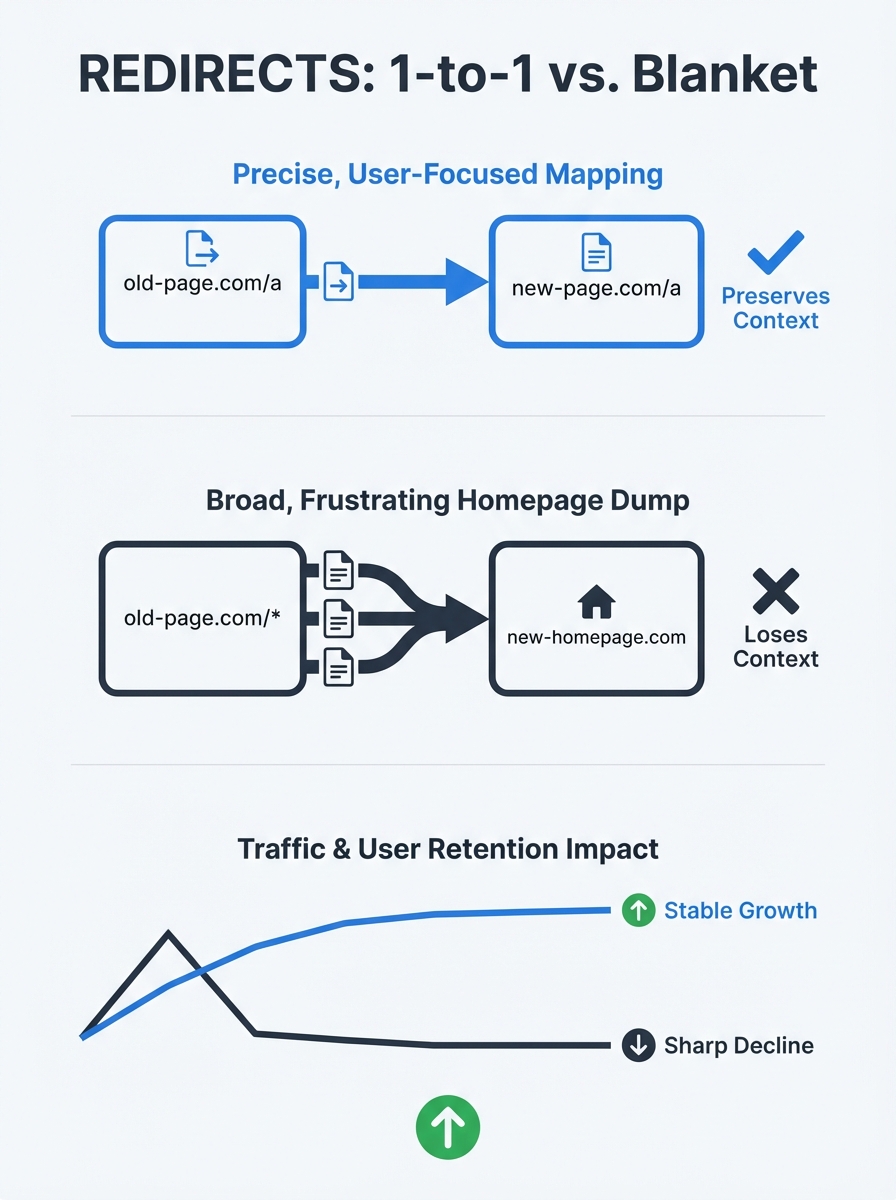
5 SEO Mistakes That Sink Websites After Site Migrations (And How to Avoid Them)
Every site migration I've worked on has had at least one moment where someone on the team says, "Wait, why did our traffic just drop 40%?" The worst part isn't the drop itself. It's realizing the cause was entirely preventable. I've helped recover sites that lost six figures in monthly organic revenue because a single checkbox was missed during migration, and I've watched teams execute flawless transitions because they respected the process. The difference between those outcomes almost always comes down to five specific mistakes that keep showing up, project after project.
Site migration SEO is one of those disciplines where the theory sounds straightforward but the execution is full of landmines. Whether you're changing domains, switching CMS platforms, restructuring URLs, or all three at once, the stakes are real. Google treats every new URL as a fresh page that needs to be crawled and indexed from scratch, which means your carefully built authority can vanish overnight if you don't handle the transition correctly.
So let me walk you through the five mistakes I see most often, why they're so destructive, and the specific steps that actually work for preserving search rankings.
Lazy Redirect Mapping (or No Redirects at All)
This is the big one. If you get nothing else right, get your 301 redirects right.
The most common version of this mistake is blanket-redirecting everything to the homepage. I've seen agencies do this on sites with hundreds of well-ranking pages, wiping out years of topical authority in a single deployment. As documented by Soup Agency's analysis of migration failures, sites that redirect all legacy pages to the homepage during migration destroy the relevance signals Google had built for each individual URL.
The correct approach is a one-to-one redirect map. Every old URL gets a 301 redirect pointing to its closest equivalent on the new site. Search Engine Land's migration guide confirms this: the best option is to map content identically, then implement 301 redirects page by page.
Here's what your redirect strategy should include:
Crawl your entire existing site and export every URL
Map each old URL to its new equivalent on the destination site
Implement 301 (permanent) redirects, not 302 (temporary) ones
Avoid redirect chains where URL A points to URL B which points to URL C
Test every redirect before launch, not after
That last point matters more than people think. As Collaborada's guide to redirect best practices emphasizes, you should always redirect from the original URL to the final destination directly. Chains slow down server response time and dilute the ranking signals you're trying to preserve.
And don't forget about redirect cleanup after migration. Many teams implement redirects and never revisit them. Three months later, internal links are still pointing to old URLs, creating unnecessary server load and crawl waste. Update your internal links to point directly to new URLs as soon as the migration is stable.
Losing Metadata in the CMS Transition
This one is sneaky because it often doesn't surface until weeks after launch, when someone finally notices that every page on the site has the same generic title tag.
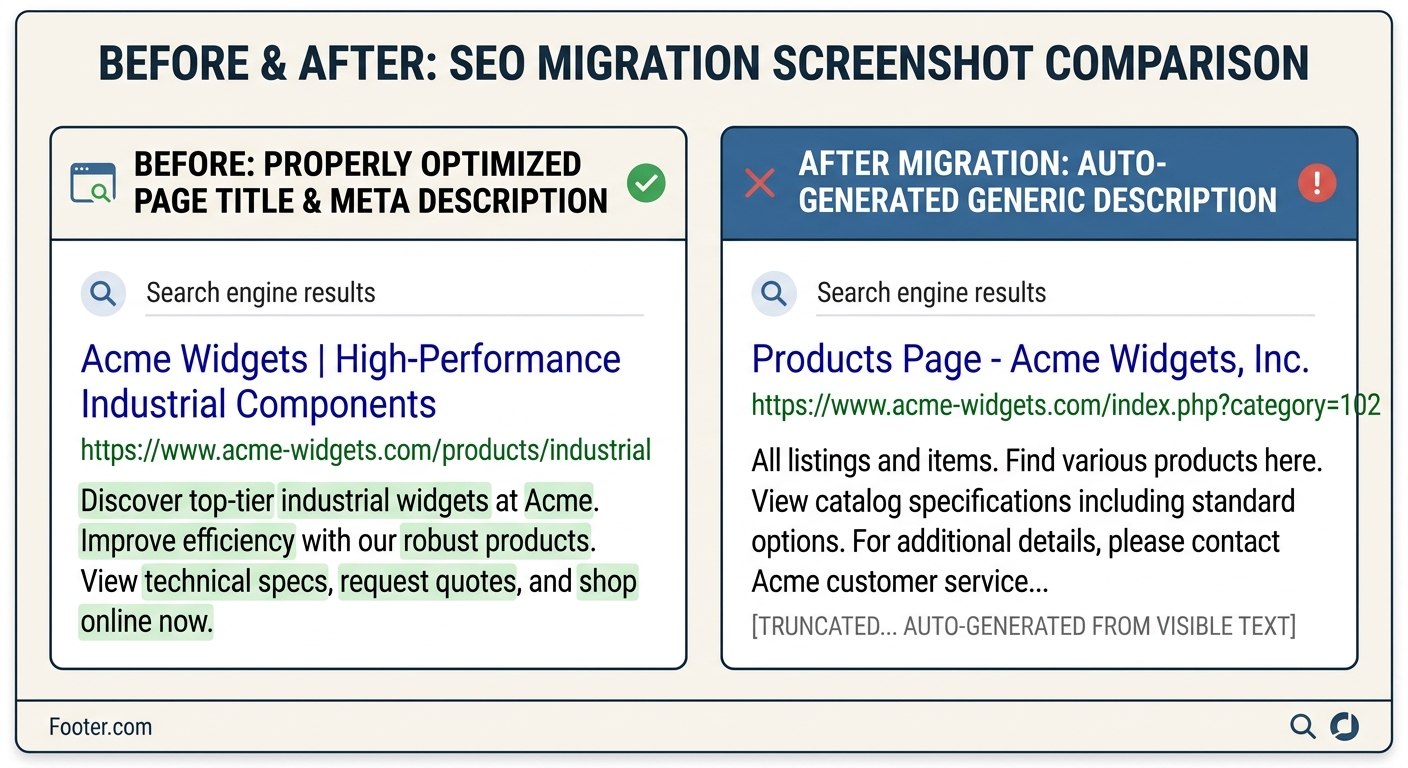
When you switch CMS platforms, your title tags, meta descriptions, Open Graph data, and structured markup don't automatically carry over. The fields in WordPress don't map neatly to Shopify, which don't map neatly to a headless CMS. Search Engine Journal's migration best practices guide specifically calls out that you need to document title tags and meta descriptions for all pages on your site before migration begins.
I learned this the hard way on a project where we migrated a 2,000-page B2B site from a legacy CMS to a modern platform. The development team assured us everything would transfer cleanly. It didn't. About 60% of the pages ended up with auto-generated title tags pulled from H1 headers, which were often truncated or different from the carefully optimized originals. Organic CTR dropped 22% in the first month.
Your migration best practices checklist for metadata should cover:
Export all title tags, meta descriptions, and canonical URLs from the old site
Map these to the new site's CMS fields explicitly
Verify that structured data (schema markup) renders correctly on the new platform
Check that robots directives (noindex, nofollow) transferred accurately
Run a full crawl comparison between old and new sites before going live
The pre-migration export is your insurance policy. If something goes wrong, you can restore metadata quickly instead of trying to reconstruct it from memory or cached versions of your pages.
Accidentally Blocking Search Engines from Your Live Site
This sounds too dumb to actually happen. It happens constantly.
During development, your staging site should be blocked from search engines. That's basic hygiene. But when the site goes live, those blocks need to come off. The problem is that staging environment protections often get baked into configuration files that nobody thinks to update during deployment.
FastFWD's analysis of 20 common migration mistakes warns that disallowing the root directory in your robots.txt file blocks the entire site from being indexed. They recommend running a site crawl on your new site immediately after launch to identify 404 pages, 500 internal server errors, and any other crawlability issues.
The variations of this mistake I've encountered include:
Robots.txt carrying over a "disallow all" directive from staging
Noindex meta tags left on every page template
Canonical tags pointing to staging URLs instead of production
XML sitemaps referencing the staging domain
Password protection still active on certain subdirectories
Google's own documentation on site moves and migrations covers the technical requirements, but the real fix here is process-oriented. You need a launch-day checklist that a human being walks through line by line. Automated deployments are great, but they'll faithfully replicate every mistake in your staging environment if you let them.
If you're working with an external team on your migration, this is exactly the kind of detail that separates good agencies from mediocre ones. We've written about the criteria that actually matter when evaluating SEO partners, and technical migration competence should be near the top of your list.
Ignoring Content Parity and Internal Link Structure
Migrations often coincide with redesigns, and redesigns almost always involve "content cleanup." That phrase should make you nervous.
Teams love to combine a technical migration with a content overhaul. They'll merge pages, delete "thin" content, reorganize categories, and rewrite copy. Each of those changes might be individually justified, but doing all of them simultaneously during a migration makes it nearly impossible to diagnose what caused any resulting traffic drops.
Search Engine Journal's deep dive on migration mistakes identifies content changes as one of the primary drivers of post-migration ranking losses, alongside technical SEO problems and rushed project timelines. The recommendation is straightforward: migrate first, optimize later.
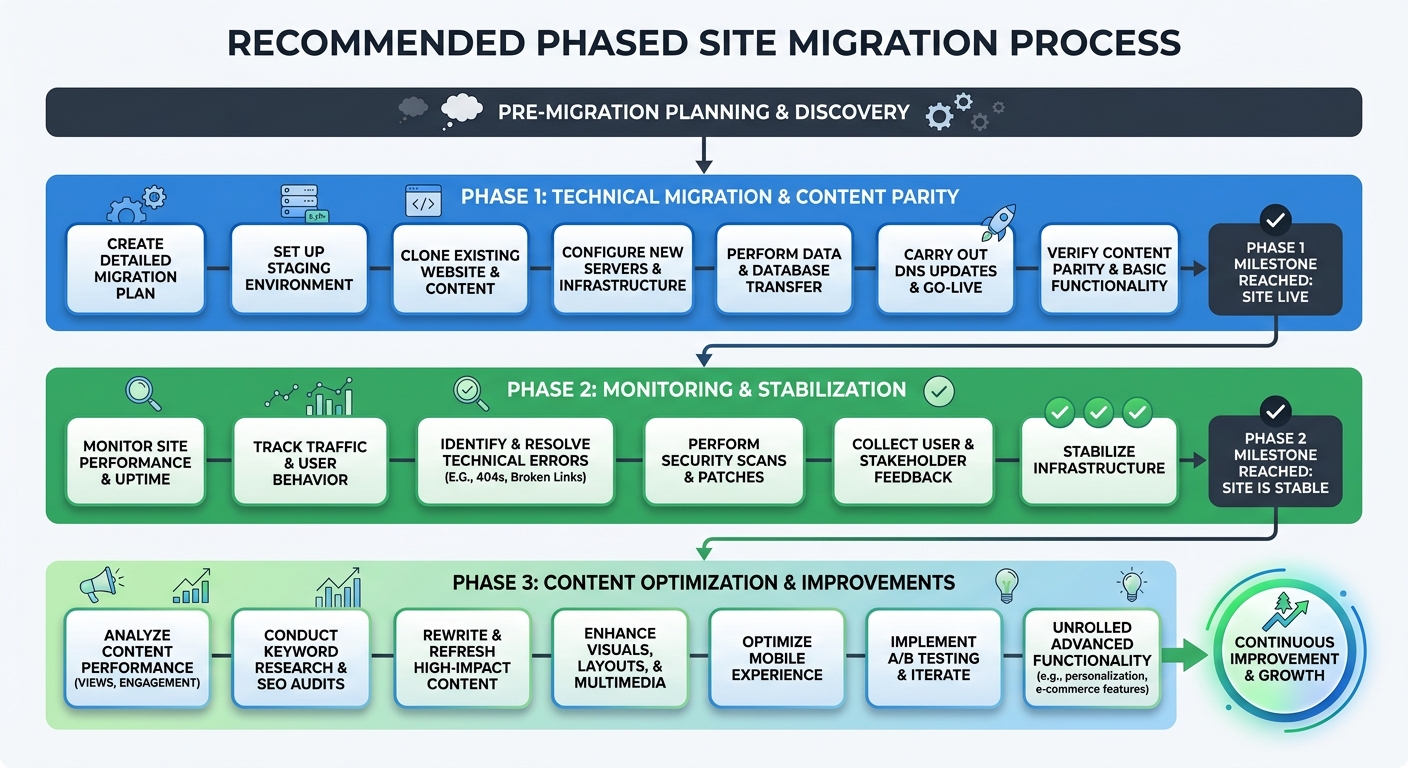
Here's the phased approach I use:
Phase 1 (Migration): Move everything as-is. Same content, same structure, same internal links. The only changes should be URL patterns and platform-specific adjustments.
Phase 2 (Stabilization): Monitor for 4-6 weeks. Verify that Google has crawled and indexed the new URLs. Confirm that rankings and traffic have stabilized.
Phase 3 (Optimization): Now make content changes, merge pages, update internal linking. Because you migrated cleanly, you can measure the impact of each change independently.
Internal link structure deserves special attention here. When you rebuild a site's navigation and footer links, you're changing the flow of authority through your entire domain. Pages that previously received strong internal signals might suddenly become orphans. Run a crawl comparison to ensure every important page is still reachable within three clicks of the homepage.
This is especially critical for larger organizations where enterprise-level SEO requirements mean thousands of pages and complex site architectures that can easily develop gaps during restructuring.
No Pre-Migration Baseline or Post-Migration Monitoring Plan
You can't measure what you didn't benchmark. Yet I regularly encounter teams that launch a migrated site with no documented record of where they started.
Your pre-migration baseline should include:
Organic traffic by landing page (not just sitewide totals)
Keyword rankings for your top 100-200 terms
Crawl stats from Google Search Console (pages crawled per day, crawl errors)
Core Web Vitals scores for key page templates
Backlink profile with referring domains per page
Indexed page count
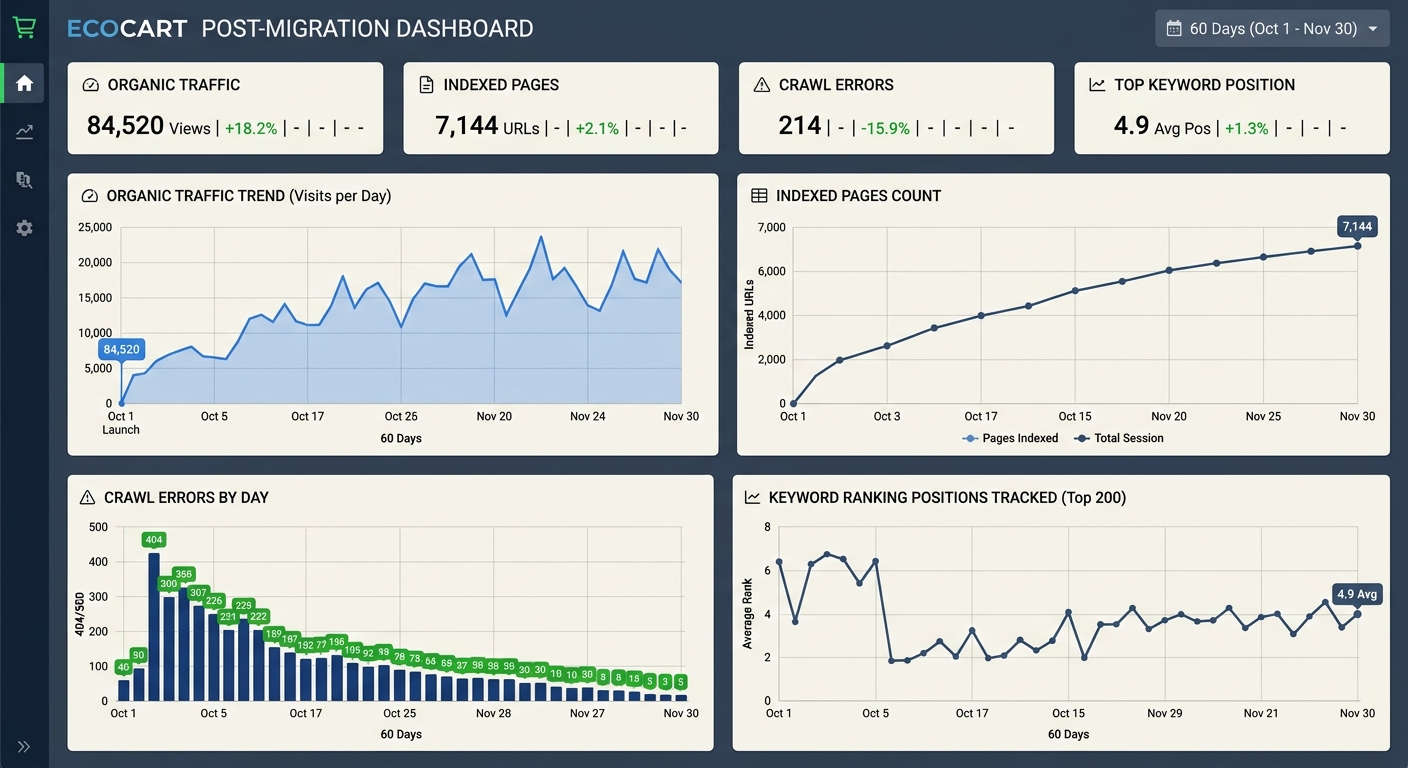
After launch, you need to monitor these same metrics daily for the first two weeks, then weekly for at least two months. Traffic fluctuations in the first 7-10 days are normal. Sustained drops beyond two weeks indicate a problem that needs investigation.
Post-migration monitoring also means watching your server logs. Are Googlebot requests returning 200 status codes for your new URLs? Are the 301 redirects firing correctly? Are there unexpected 404s or 500 errors? Tools that crawl your site externally are helpful, but server logs tell you exactly what Google is experiencing in real time.
One thing I've seen teams overlook is the interaction between migration timing and Google's algorithm updates. If you migrate your site during the same window as a core update, you'll have no idea which changes are causing your ranking fluctuations. Understanding how to audit your site after a core update is useful knowledge even outside of migration contexts, but it's absolutely essential if your migration timeline overlaps with one.
What Actually Matters After the Migration
Every successful site migration I've been part of shared one trait: the team treated it as a risk management exercise, not a feature launch. Migrations aren't exciting. They shouldn't be. The goal is for your users and Google to barely notice anything changed.
Here's the condensed version of migration best practices that have saved me repeatedly:
Build your one-to-one redirect map before writing a single line of new code
Export and verify all metadata, structured data, and robots directives
Migrate content as-is first, optimize after stabilization
Create a launch-day checklist that covers robots.txt, canonicals, sitemaps, and analytics tracking
Establish your traffic and ranking baseline at least 30 days before migration
Monitor aggressively for 60 days post-launch with automated alerts
Site migration SEO isn't about knowing exotic techniques. It's about disciplined execution of fundamentals. The teams that lose traffic are almost never facing novel technical challenges. They're skipping steps, combining too many changes, or assuming someone else checked the thing that nobody checked.
Build the checklist. Follow the checklist. Trust the checklist. Your rankings will thank you.
Marcus Webb
Digital marketing consultant and agency review specialist. With 12 years in the SEO industry, Marcus has worked with agencies of all sizes and brings an insider perspective to agency evaluations and selection strategies.
Frequently Asked Questions
- What is the correct way to redirect URLs during a site migration?
- Implement a one-to-one redirect map where every old URL gets a 301 (permanent) redirect pointing to its closest equivalent on the new site. Avoid redirect chains and use 301 redirects instead of 302s, as 301s signal to Google that the move is permanent and transfer ranking signals, while 302s indicate a temporary move that may keep the old URL in Google's index indefinitely.
- Why do title tags and meta descriptions get lost during CMS migrations?
- When switching CMS platforms, metadata like title tags, meta descriptions, and structured markup don't automatically carry over because the fields in one platform don't map neatly to another. You need to export all metadata from the old site before migration and explicitly map it to the new CMS fields to prevent auto-generated or generic replacements.
- How do search engines get accidentally blocked after site migrations?
- Staging environment protections like "disallow all" directives in robots.txt, noindex meta tags, or canonical tags pointing to staging URLs often get overlooked during deployment and remain active on the live site. A launch-day checklist should verify that robots.txt, noindex tags, canonicals, and sitemaps all reference production URLs, not staging environments.
- Should you combine a site migration with a content overhaul and redesign?
- No—it's best to migrate first and optimize later. Combine migration with content changes, page merges, and structural reorganization makes it impossible to diagnose what caused traffic drops. Migrate everything as-is in phase one, monitor for 4-6 weeks in phase two, then make content changes in phase three once rankings stabilize.
- What metrics should you track before and after a site migration?
- Establish a pre-migration baseline including organic traffic by landing page, keyword rankings for top 100-200 terms, crawl stats from Google Search Console, Core Web Vitals scores, backlink profile, and indexed page count. After launch, monitor these same metrics daily for two weeks, then weekly for at least two months, with automated alerts set for 20% traffic declines sustained over 48 hours.
- How long should you wait before making content and structural changes after migration?
- Monitor for 4-6 weeks after migration to verify that Google has crawled and indexed the new URLs and that rankings and traffic have stabilized. Only after this stabilization period should you make content changes, merge pages, or update internal linking, so you can measure the impact of each change independently.
- What should you check on launch day of a site migration?
- Use a launch-day checklist to verify robots.txt doesn't contain blocking directives, noindex tags are removed from templates, canonical tags point to production URLs, XML sitemaps reference the correct domain, and all 301 redirects are firing correctly. Run a site crawl immediately after launch to identify 404 pages and 500 errors.
Explore more topics