
Building SEO-Friendly Website Architecture: A Developer's Step-by-Step Implementation Guide
Developers often treat site structure as whatever falls out of their framework's routing system.
 Marcus Webb··9 min read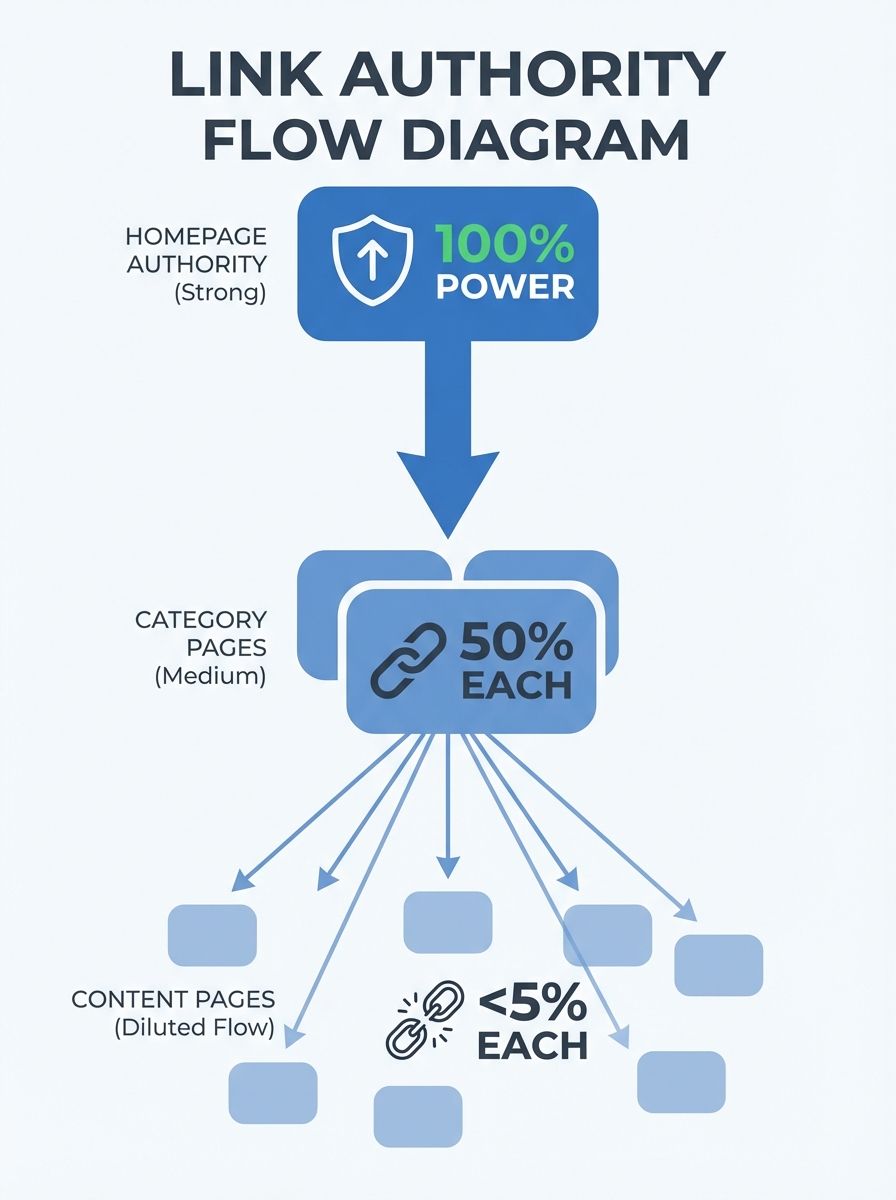
Building SEO-Friendly Website Architecture: A Developer's Step-by-Step Implementation Guide
Developers often treat site structure as whatever falls out of their framework's routing system. But every page on a 4,000-page e-commerce site we rebuilt was technically reachable, with valid HTML and solid content—yet organic traffic had flatlined for months because 60% of those pages sat five or more clicks from the homepage, buried under a navigation structure that no crawler could efficiently parse. When we flattened the hierarchy and reworked the internal linking, organic sessions jumped 34% in eight weeks. No new content. No new backlinks. Just architecture.
That experience cemented something I now tell every developer I work with: site architecture isn't a design problem or a marketing problem. It's an engineering problem. And if you build it wrong, no amount of great content will save you.
This is the implementation guide I wish I'd had before that rebuild. It's aimed at developers who understand code but want a practical framework for building an SEO-friendly site structure from the ground up, or fixing one that's already gone sideways.
Why Architecture Matters More Than You Think
Site structure shapes how search engines see your entire site as a graph of interconnected nodes. The shape of that graph determines which pages get crawled, how frequently they get revisited, and how much ranking authority flows between them.
A poorly structured site wastes crawl budget. Google allocates a finite number of pages it will crawl on any given visit, and if your important product or service pages are hidden behind six layers of navigation, they simply won't get indexed as quickly or as reliably. According to Semrush's guide on website structure best practices, breadcrumb markup and clear hierarchies directly impact how search engines discover and process content.
The stakes get even higher when you consider link authority flow. Every internal link passes a portion of PageRank from one page to another. If your homepage (typically your highest-authority page) links to a bloated mega-menu with 200 items, that authority gets diluted across all of them. But if it links strategically to 7 top-level categories, each of those categories gets a meaningful share, which they can then pass down to subcategories and individual pages.
Start With Your Information Hierarchy
Before you write a single line of routing logic, map out your site's information hierarchy on paper or a whiteboard tool. This is the single most important step, and it's the one developers often skip.
Think of it like database schema design. You wouldn't start building tables without understanding the relationships between entities. Your site architecture works the same way.
The approach I recommend uses content pillars and topic clusters. As Backlinko's architecture guide illustrates with real examples, sites like Best Buy link from their homepage to all major categories, and those categories link down to subcategories and product pages. This creates a clean tree structure where every page has a logical parent.
Here's how to plan it:
List every page type your site needs (homepage, category pages, product or service pages, blog posts, utility pages like contact or about)
Group content pages under parent topics that represent your core business areas
Assign each group a pillar page that covers the broad topic
Map cluster pages beneath each pillar that cover specific subtopics
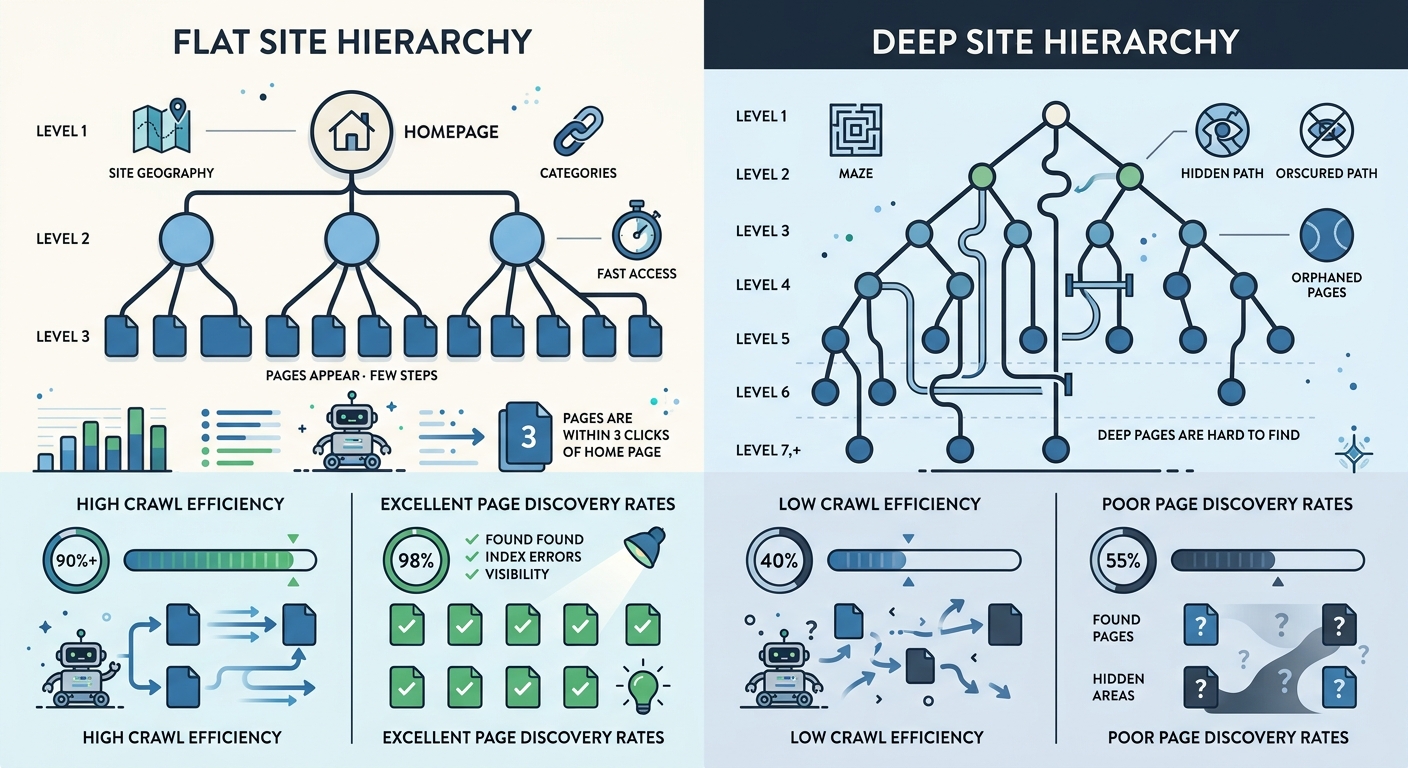
Verify that no page type is more than three levels deep from the homepage
That third point about depth is critical. The three-click rule isn't just a UX heuristic. Flat architectures improve crawl efficiency by up to 40% for sites with over 1,000 pages, because crawlers can reach and index deep content without burning through their crawl budget on navigation layers.
Building the URL Structure
Your URLs should mirror your hierarchy exactly. When someone reads a URL, they should be able to guess where they are in your site's structure.
Keep URLs simple, readable, and consistent. SEO.com's technical guide puts it well: ensure URLs for new pages are easy to understand and accurately reflect the page content. A URL like yoursite.com/services/residential-design tells both users and crawlers exactly what to expect.
Rules I follow for every project:
Use hyphens between words, never underscores
Keep URLs under 60 characters when possible
Include the primary keyword for that page naturally
Match the URL path to the site hierarchy (a subcategory URL should contain the category slug)
Never include session IDs, tracking parameters, or file extensions in indexable URLs
Use lowercase exclusively to avoid duplicate content from case variations
One mistake I see constantly is developers letting their CMS auto-generate URLs from page titles. You end up with slugs like /our-amazing-premium-gold-tier-consulting-services-for-enterprise-clients when /services/enterprise-consulting would do the job better for both humans and search engines.
Internal Linking: The Architecture Within the Architecture
URL hierarchy gives your site its skeleton. Internal linking gives it a nervous system.
The most common pattern I implement is bidirectional linking between parent and child pages. Every category page links to its subcategories. Every subcategory links back up to the category and also across to related subcategories when it makes sense. Blog posts link to relevant service pages, and service pages link to supporting blog content.
This creates what SEO practitioners call silos, and they're incredibly effective for establishing topical authority. When Google crawls a cluster of interlinked pages all focused on the same subject, it builds confidence that your site genuinely covers that topic in depth.
Practical implementation tips:
Add contextual links within body content, not just navigation menus. A link embedded in a paragraph carries more semantic weight than one in a sidebar widget.
Use descriptive anchor text that tells both users and crawlers what the target page is about. "Our approach to kitchen remodeling" beats "click here" every time.
Audit for orphan pages quarterly. These are pages with zero internal links pointing to them, and search engines often ignore them entirely. Tools like Sitebulb, as covered in their technical implementation guide, can surface these quickly.
Cap your main navigation at 5 to 7 top-level items. HubSpot's architecture overview recommends a simple top-level menu, and I've found this directly improves both user engagement and crawl efficiency.
Breadcrumbs and Structured Data
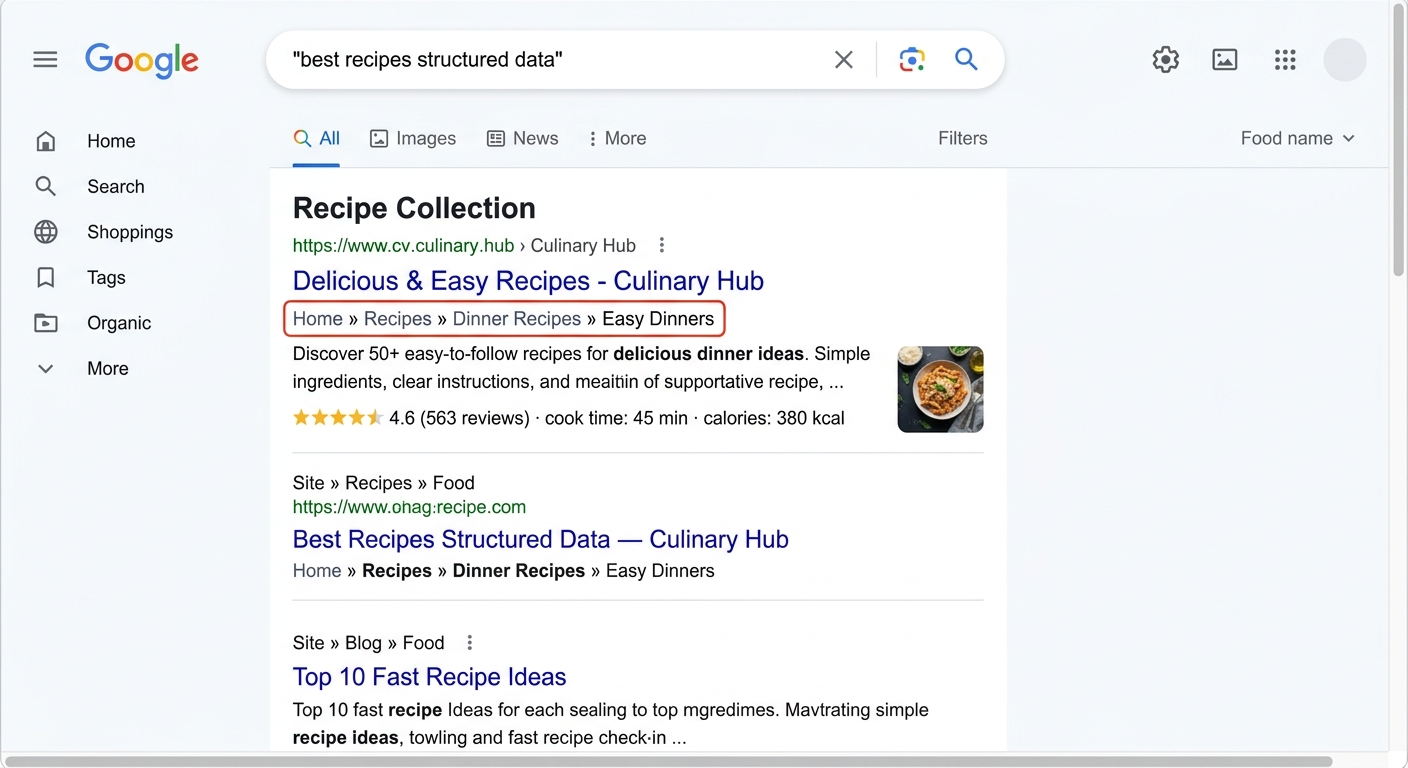
Breadcrumbs serve double duty. For users, they provide a clear navigation trail back through your hierarchy. For search engines, they confirm the parent-child relationships you've built into your URL structure.
Implement breadcrumbs on every page except the homepage. Use the BreadcrumbList schema type from Schema.org so search engines can parse the hierarchy programmatically. When implemented correctly, breadcrumbs appear directly in search results, giving users context about your site's structure before they even click.
The markup itself is straightforward JSON-LD injected into your page head. Each breadcrumb item includes a name and a URL, forming an ordered list from homepage down to the current page. If you're using a framework like Next.js or Nuxt, build a reusable breadcrumb component that auto-generates the schema based on the current route path. Don't hardcode it per page.
Sitemaps: XML for Crawlers, HTML for Humans
You need both.
An XML sitemap is your direct communication channel with search engines. It lists every URL you want indexed, along with metadata like when it was last modified and how frequently it changes. Submit it through Google Search Console and make sure it updates automatically whenever you publish or remove content. Engenius describes sitemaps as the foundational blueprint of a site's content structure, and that's exactly right.
An HTML sitemap is a user-facing page that lists all your important pages organized by category. It's not glamorous, but it serves two purposes: it helps users who get lost find what they need, and it provides an additional set of internal links that search engines can follow.
For the XML sitemap specifically, make sure you're including lastmod tags with accurate dates. Sites using properly maintained lastmod values see indexing speed improvements of roughly 30% for new and updated content. Don't set every page to today's date on each build. That signals to Google that your lastmod tags are unreliable, and they'll start ignoring them.
Making Your Architecture Crawlable
A beautiful hierarchy means nothing if technical barriers prevent search engines from traversing it. Here's the crawlable website design checklist I run through on every project:
Render all navigation links as standard HTML anchor elements with href attributes. JavaScript-rendered links that rely on click handlers without proper hrefs are invisible to most crawlers.
Ensure your robots.txt file isn't accidentally blocking important sections. I've seen staging disallow rules ship to production more times than I'd like to admit.
Set canonical tags on every page to prevent duplicate content issues from URL parameters, trailing slashes, or www versus non-www variations.
Implement hreflang tags if you serve content in multiple languages or regions.
Keep your server response times under 200ms for HTML documents. Slow servers cause crawlers to reduce their crawl rate, meaning fewer pages get indexed per session.
Fix redirect chains. A single 301 redirect is fine. Three chained redirects waste crawl budget and dilute link authority at each hop.
After Google's March 2026 core update, sites with clean technical foundations saw the most stable rankings. If you haven't run a post-update audit, it's worth reviewing your site's performance against the latest changes to catch any structural issues that may have surfaced.
Mobile Architecture Considerations
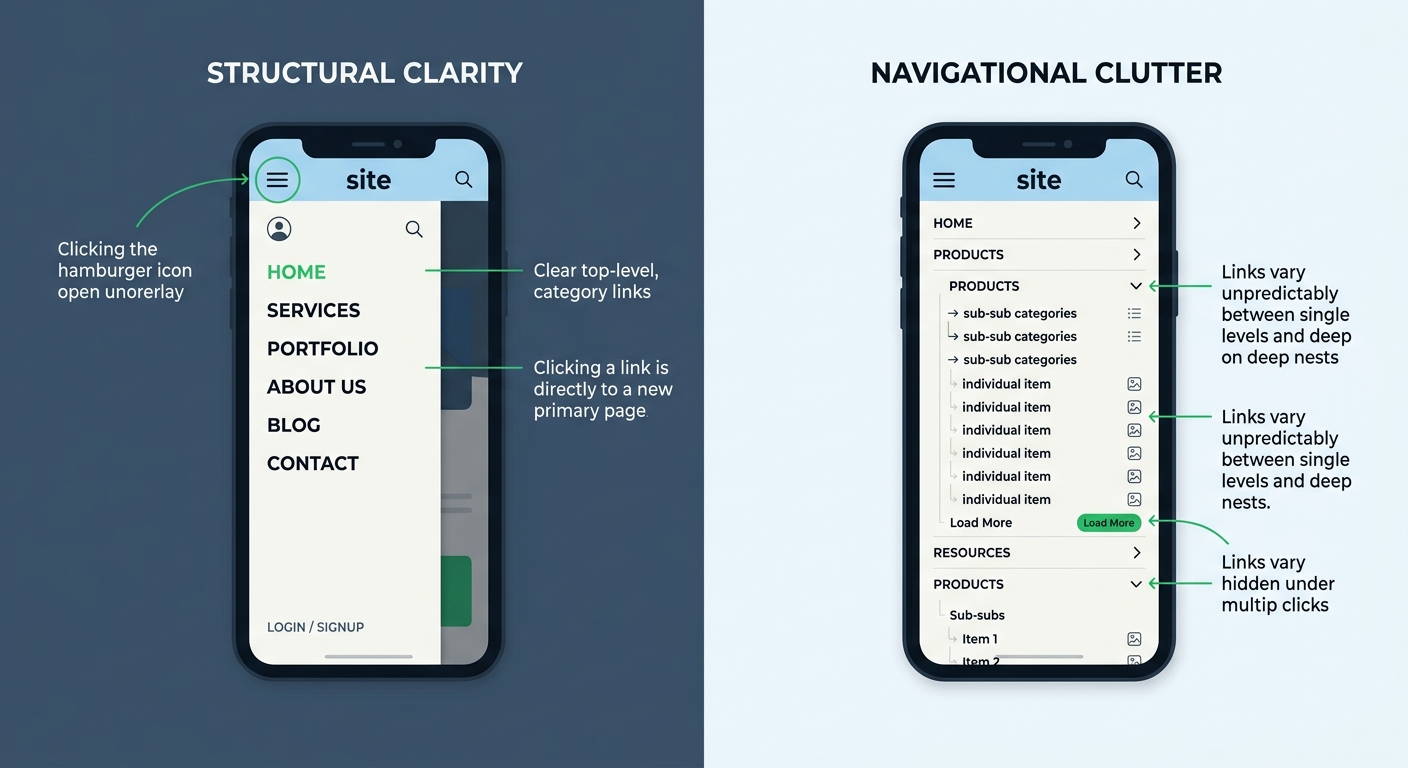
Google uses mobile-first indexing, which means the mobile version of your site is what gets crawled and ranked. If your mobile navigation hides important links behind multiple taps, those pages effectively lose their place in your hierarchy from Google's perspective.
Responsive design handles most of this automatically, but watch out for a few traps:
Hamburger menus that load link content dynamically on tap rather than including it in the initial HTML
Accordion sections that use CSS display:none on content Google needs to see (Google does render CSS, but historically discounts hidden content)
Infinite scroll implementations that don't provide pagination fallbacks for crawlers
Touch targets smaller than 48 pixels that trigger mobile usability warnings in Search Console
Test your mobile architecture separately from desktop. Run your key pages through Google's Mobile-Friendly Test and check the rendered HTML to confirm all internal links are present and crawlable.
When to Consider Restructuring
Not every site needs a full rebuild. But certain signals suggest your website architecture implementation has drifted out of alignment:
Crawl stats in Google Search Console show declining pages crawled per day
Important pages take weeks to get indexed after publication
Your average click depth (available in crawl tools) exceeds 4 for key landing pages
You have a growing number of orphan pages that nobody links to
Users consistently bounce from category pages because they can't find what they need
If you spot three or more of these, it's time for a structural audit. And if you're working with an external SEO team, knowing how to evaluate their technical expertise matters. Architecture problems require developers and SEO practitioners working together, not in silos.
What This Architecture Work Gets You
Good site architecture multiplies the value of everything else you build. It makes every piece of content you publish more discoverable, every backlink you earn more impactful, and every dollar you spend on content marketing go further.
Start with the information hierarchy. Map your page types, define parent-child relationships, and ensure nothing important sits more than three clicks from the homepage. Build URLs that mirror that hierarchy. Wire up internal links bidirectionally between related content. Add breadcrumbs with structured data. Generate and maintain both XML and HTML sitemaps. Then audit the whole thing quarterly with a crawl tool to catch orphan pages, broken links, and depth issues before they compound.
Architecture isn't something you set and forget. It's a living system that evolves with your content. Treat it like infrastructure code: version it, test it, and review it regularly. Your rankings will reflect the care you put into the foundation.
Marcus Webb
Digital marketing consultant and agency review specialist. With 12 years in the SEO industry, Marcus has worked with agencies of all sizes and brings an insider perspective to agency evaluations and selection strategies.
Frequently Asked Questions
- How deep should website pages be from the homepage for SEO?
- No important page should be more than three clicks from the homepage. Flat architectures improve crawl efficiency by up to 40% for sites with over 1,000 pages, because crawlers can reach and index deep content without burning through their crawl budget on navigation layers.
- What URL structure is best for SEO?
- URLs should mirror your site hierarchy, use hyphens between words, stay under 60 characters when possible, include the primary keyword naturally, and match the URL path to the site hierarchy. For example, yoursite.com/services/residential-design clearly tells both users and crawlers what to expect.
- How does internal linking affect SEO rankings?
- Internal links pass PageRank from one page to another, and strategic linking to top-level categories ensures each receives meaningful authority to pass down to subcategories and individual pages. Contextual links within body content carry more semantic weight than navigation menu links.
- What are orphan pages and why do they matter for SEO?
- Orphan pages are pages with zero internal links pointing to them, and search engines often ignore them entirely. You should audit for orphan pages quarterly using tools like Sitebulb to maintain your site's crawlability.
- Do I need both XML and HTML sitemaps?
- Yes. An XML sitemap is your direct communication channel with search engines to list every URL you want indexed, while an HTML sitemap helps users who get lost and provides additional internal links for search engines to follow. Include accurate lastmod tags in the XML sitemap for roughly 30% faster indexing of new and updated content.
- How many top-level navigation items should a website have?
- Cap your main navigation at 5 to 7 top-level items, as this directly improves both user engagement and crawl efficiency compared to bloated mega-menus that dilute link authority.
- What mobile architecture issues hurt SEO rankings?
- Since Google uses mobile-first indexing, avoid hamburger menus that load links dynamically, accordion sections using CSS display:none, infinite scroll without pagination fallbacks, and touch targets smaller than 48 pixels. Test your mobile architecture separately to confirm all internal links are present and crawlable.
- When should I restructure my website architecture?
- Consider restructuring if Google Search Console shows declining pages crawled per day, important pages take weeks to index, average click depth exceeds 4 for key pages, you have growing orphan pages, or users bounce from category pages. Three or more of these signals suggest it's time for a structural audit.
Explore more topics