
SEO debugging: A practical framework for fixing visibility issues fast
---
 Marcus Webb··8 min read
SEO Debugging: A Practical Framework for Fixing Visibility Issues Fast
A client's organic traffic dropped 38% overnight, and the entire team was convinced it was a content quality problem. They spent two weeks rewriting landing pages, adding author bios, and beefing up their E-E-A-T signals. Traffic kept falling. When I finally got access to their Google Search Console, it took me about twelve minutes to find the real culprit: a staging environment robots.txt file had been pushed to production during a routine deploy. Every important directory was disallowed. Two weeks of content rewrites, completely wasted, because nobody checked the foundation first.
That experience crystallized something I now treat as law: SEO problems must be debugged bottom-up, not top-down. You don't start with content strategy when the crawler can't even reach your pages. You don't optimize title tags when Google hasn't indexed the URL. Yet I see teams make this mistake constantly, chasing symptoms while the root cause sits untouched in a config file somewhere.
This is the framework I use every time a site loses visibility. It's not theoretical. It's battle-tested across dozens of real drops, and it consistently gets to the answer faster than any other approach I've tried.
The SEO Debugging Pyramid
Think of SEO visibility as a stack with five layers, each dependent on the one below it. The layers, from bottom to top, are: Crawl, Render, Index, Rank, Click. This model, which Search Engine Land documented in their practical debugging framework, prevents the single most common mistake in SEO troubleshooting: jumping to the wrong layer.
The rule is simple. Start at the bottom. Verify each layer before moving up. If crawling is broken, rendering doesn't matter. If rendering is broken, indexing doesn't matter. And so on.
I've used this pyramid to diagnose everything from catastrophic traffic losses to slow, creeping declines that nobody noticed for months. The structure forces discipline. It stops you from guessing.
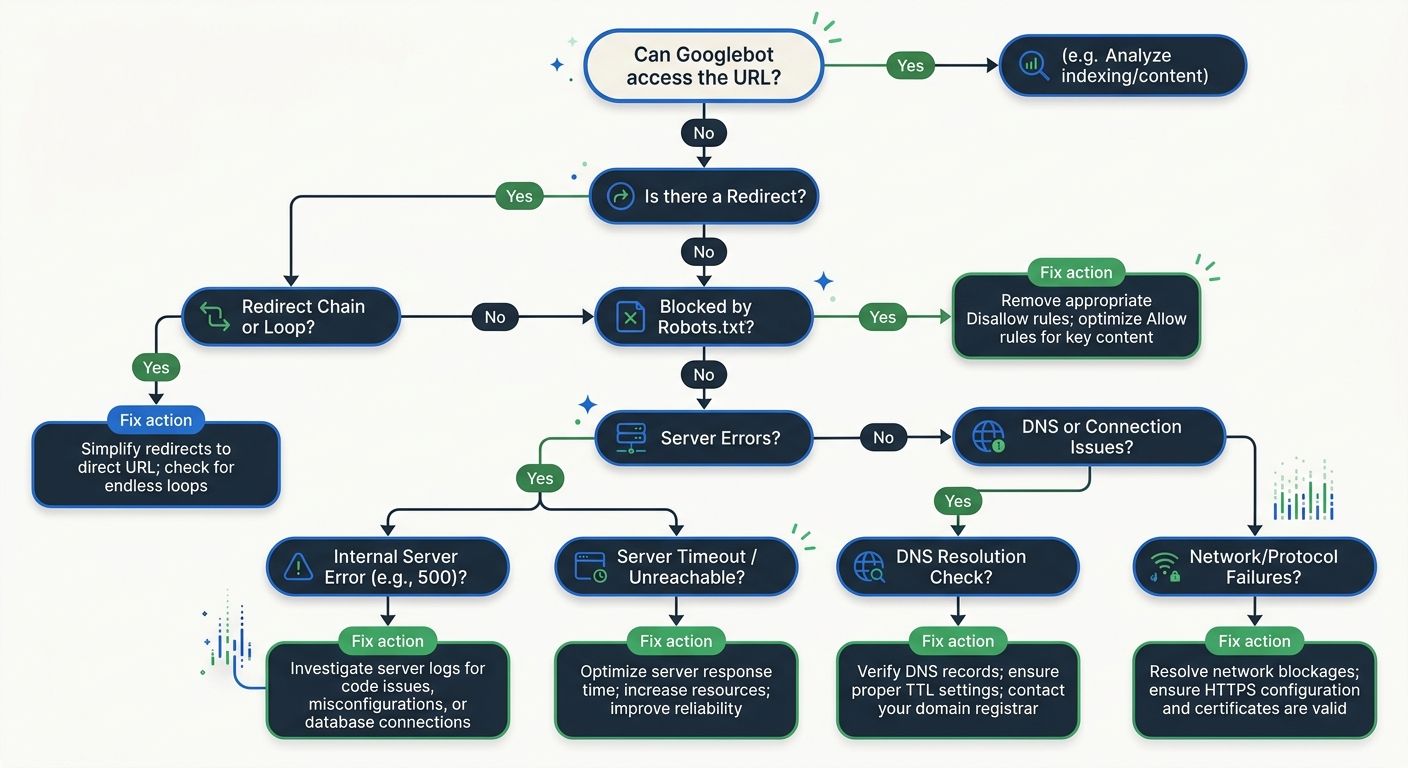
Can Google Even Reach Your Pages?
This is where roughly 30% of all SEO visibility problems live, and it's where most people skip because they assume crawling "just works." It doesn't.
Approximately 10% of websites experience regular 5xx server errors that block crawling entirely. Misconfigured robots.txt files silently prevent indexing of critical pages. Redirect chains stack up after migrations until the crawler gives up. These aren't edge cases. I see them weekly.
Here's my crawl-layer checklist:
Pull the Crawl Stats report in Google Search Console and look for spikes in "not modified" or error responses
Check robots.txt on the live production URL, not the one in your repo
Verify that XML sitemaps return 200 status codes and contain only indexable URLs
Look for redirect chains longer than two hops
Confirm server response times are under 500ms for critical pages
The fix timeline is fast here. According to industry reporting from MarTech Series, crawlability fixes like robots.txt corrections and broken link repairs typically show results within 3 to 14 days. That's the good news. Crawl problems are usually the quickest to diagnose and the quickest to resolve.
If you've been through a site migration recently, double-check this layer twice. Post-migration crawl errors are the single most common source of sudden visibility drops I encounter.
JavaScript Frameworks and the Rendering Gap
This layer has become dramatically more important as JavaScript-heavy frameworks have taken over frontend development. Google crawls and renders in separate phases, and the gap between those two steps is where things break.
The most insidious problem I encounter here is what I call the invisible error page. In React or Vue.js single-page applications, the server returns a 200 OK status code even when the page should be a 404 or 500. The user sees a friendly error message rendered by client-side JavaScript. But Googlebot may perceive thin content, or worse, index error messages as the page's actual content. Google's rendering update from late 2025 made this worse: pages returning non-200 HTTP status codes may now be excluded from the rendering pipeline entirely.
To debug rendering issues:
Use Google Search Console's URL Inspection tool and click "Test Live URL," then view the rendered HTML
Compare what Googlebot sees versus what a browser sees by checking the "Screenshot" tab
Look for resources blocked in robots.txt that are needed for rendering (CSS, JS files)
Check for client-side rendering that depends on user interaction to load content
I've found that teams building on headless CMS architectures are particularly vulnerable here, because the decoupled frontend creates more opportunities for rendering mismatches.
Google's Index Coverage Tells You Where Pages Break
You've confirmed crawling works. Rendering looks correct. But traffic is still down. Now check indexation.
Open the Pages report in Google Search Console and look at the "Not Indexed" section. Google gives you specific reasons: "Discovered - currently not indexed," "Crawled - currently not indexed," "Duplicate without user-selected canonical," "Excluded by noindex tag." Each one tells a different story.
The most common indexation killers I see:
Incorrect canonical tags pointing to the wrong URL, especially after domain migrations or CMS template changes
Soft 404s where the page returns a 200 status code but Google classifies the content as too thin to index
Schema drift where your structured data contradicts what's actually visible on the page
Schema drift deserves special attention because it's become a growing problem. As sites add more structured data for rich results, the gap between what the markup claims and what the page actually shows can widen without anyone noticing. The fix is straightforward: validate with Google's Rich Results Test and, if possible, add automated checks to your deployment pipeline that compare structured data against visible DOM content.
Fixing canonical errors alone can produce noticeable ranking recovery within 1 to 4 weeks. Larger-scale duplicate content cleanup takes longer, sometimes 6 to 12 weeks before the impact is fully visible.
Competitive Positioning and Technical Signals
If layers 1 through 3 check out clean, the problem isn't technical plumbing. It's competitive positioning. This is where most people start their debugging, which is exactly why they waste so much time.
Ranking issues fall into a few buckets:
Core Web Vitals
These still matter as a ranking signal, and the thresholds haven't changed much. You want Largest Contentful Paint under 2.5 seconds, Interaction to Next Paint below 200 milliseconds, and Cumulative Layout Shift under 0.1. But here's what the data actually says: 26.89% of websites fail LCP in lab conditions, and sites with poor INP see 40% higher bounce rates. The performance bar isn't impossibly high, yet a quarter of the web still doesn't clear it.
Practical fixes include lazy-loading offscreen images, minifying assets, using CDNs, and moving heavy computation off the main thread. Expect 2 to 6 weeks before Core Web Vitals improvements show up in ranking signals, since Google uses field data aggregated over a 28-day window.
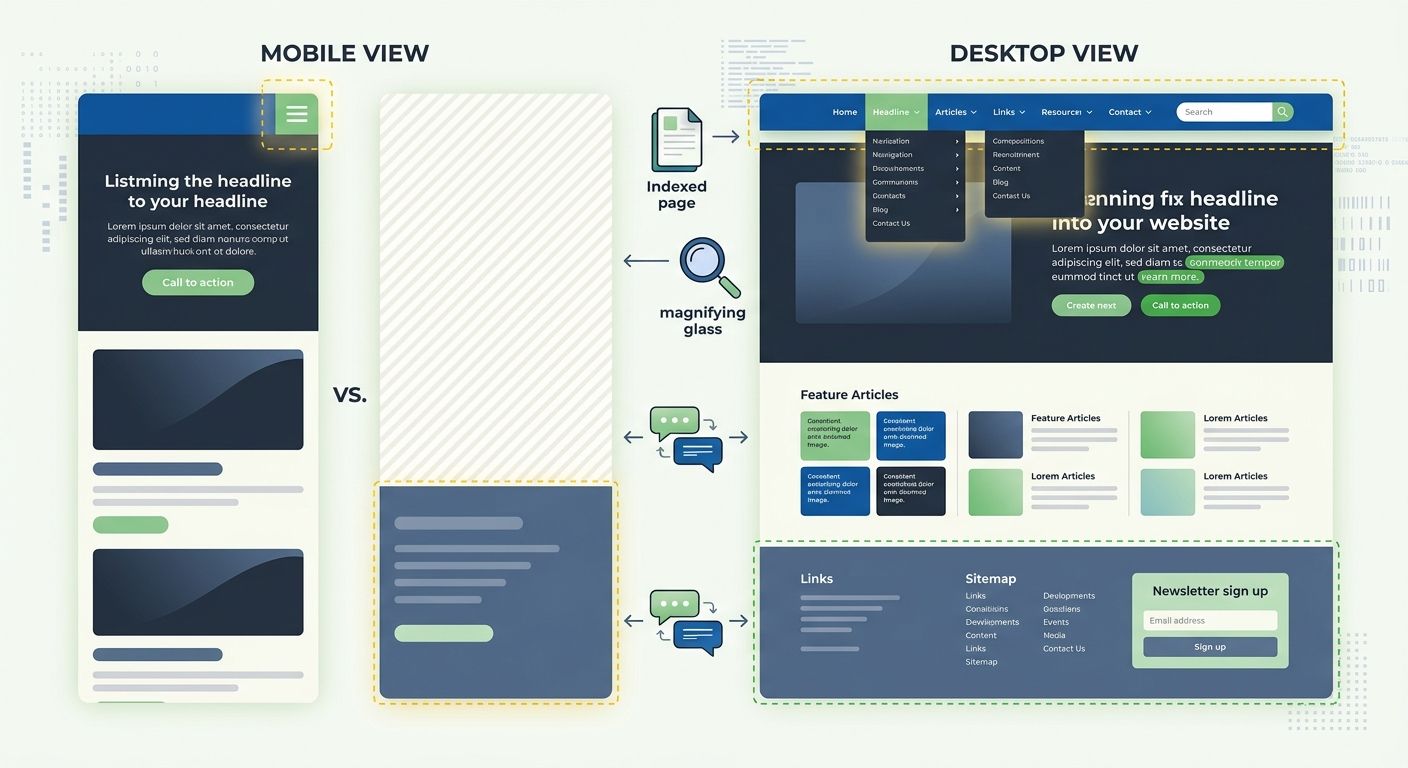
If you haven't run a mobile-first audit on your site, now is the time. Google uses mobile-first indexing, meaning your mobile experience determines rankings for both mobile and desktop results. Yet 67% of websites still serve different content between mobile and desktop versions, creating indexing gaps that are easy to miss.
E-E-A-T Signals
Websites demonstrating clear expertise rank 67% higher than generic content on the same topics. This isn't about slapping an author bio on every page. It's about genuinely demonstrating that a real human with real experience created the content.
What works: author bios with verifiable credentials, first-party data and case studies, backlinks from authoritative sources, customer reviews, and transparent business information. What doesn't work: AI-generated content with a stock photo author avatar and no verifiable history. Google's getting much better at spotting the difference, especially after the algorithm shifts we've seen in recent core updates.
Content Alignment With Search Intent
Sometimes the page ranks, just not for what you wanted. Pull your Search Console Performance report, filter by page, and look at the queries driving impressions. If Google is matching your page to queries you didn't intend, there's a content-intent mismatch. The page might need restructuring, not rewriting.
SERP Presentation Problems
You rank. You're on page one. But clicks are disappointing. This is a SERP presentation problem.
Check your title tags and meta descriptions in Search Console's Performance report by looking at the difference between impressions and clicks. A page with high impressions but low click-through rate has a presentation problem. Maybe Google is rewriting your title (it does this more aggressively now). Maybe your meta description doesn't match the searcher's intent. Maybe a competitor has a rich snippet and you don't.
Structured data plays a big role here. FAQ schema, review schema, breadcrumb schema, and product schema can all add visual real estate to your SERP listing. But only if the markup validates and stays in sync with visible content (see schema drift above).
The 72-Hour Sprint
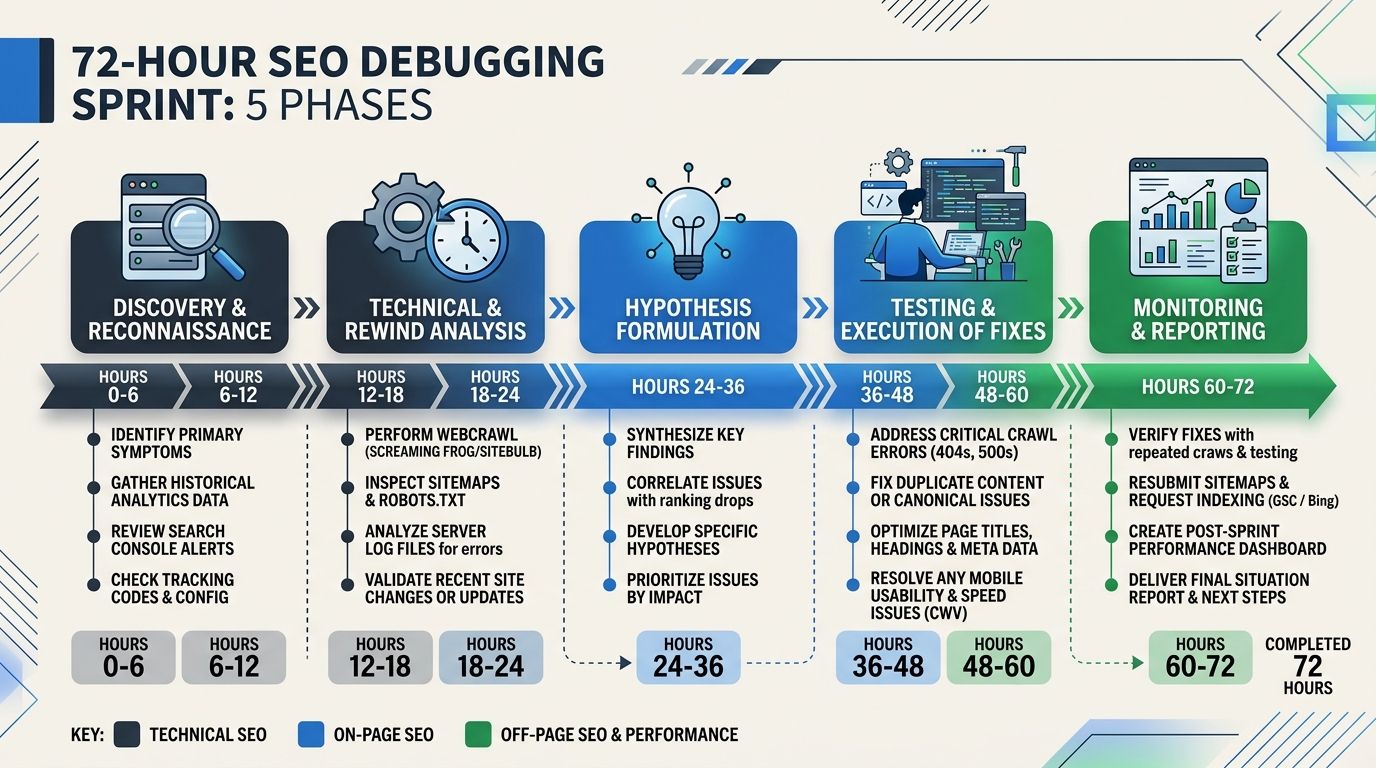
When visibility drops, speed matters. Here's how I compress this framework into an actionable sprint. I've written about this systematic approach to diagnosing drops in more detail, but the condensed version looks like this:
Hours 0-4: Triage. Confirm the drop is real. Check if it's site-wide or page-specific. Rule out tracking issues. Compare Google Search Console data against analytics.
Hours 4-12: Crawl and Render. Run through layers 1 and 2. Check robots.txt, server errors, redirect chains, and rendering output. This catches about 40% of issues in my experience.
Hours 12-24: Index. Pull the full index coverage report. Look for sudden changes in indexed page counts. Check canonical tags on affected pages.
Hours 24-48: Rank. Analyze Core Web Vitals, competitor movements, and content quality signals. Check if a Google algorithm update coincided with the drop.
Hours 48-72: Click and reporting. If the problem is CTR-related, test new titles and descriptions. Document findings and create a prioritized fix list with expected recovery timelines.
Set Honest Expectations
One thing I always tell clients: SEO recovery is not instant, but it is predictable. Based on what I've seen across dozens of recoveries, and consistent with reporting from Knox News, here's what to expect:
Crawl fixes: 3 to 14 days
Indexation fixes: 1 to 4 weeks
Core Web Vitals improvements: 2 to 6 weeks
Structured data corrections: 1 to 4 weeks
Large-scale duplicate content cleanup: 6 to 12 weeks
Work Bottom-Up Every Time
Stop debugging SEO from the top down. The next time traffic drops, resist the urge to immediately rewrite content or chase backlinks. Open Google Search Console. Check if Google can crawl the page. Check if it renders correctly. Check if it's indexed. Only then look at ranking factors and click-through optimization.
The pyramid isn't clever. It's obvious, once you've wasted enough time doing it wrong. I wasted plenty. The framework exists specifically so you don't have to repeat that experience. Tape it to your monitor if you need to. Bottom up, every single time.
Marcus Webb
Digital marketing consultant and agency review specialist. With 12 years in the SEO industry, Marcus has worked with agencies of all sizes and brings an insider perspective to agency evaluations and selection strategies.
Frequently Asked Questions
- What should I check first when my website's organic traffic drops?
- Start by verifying the five layers of SEO visibility from bottom to top: crawl, render, index, rank, and click. Begin with crawl issues like robots.txt files, server errors, and redirect chains, as roughly 30% of all SEO visibility problems occur at this layer and are typically the quickest to diagnose and fix.
- How do I check if Google can crawl my website?
- Pull the Crawl Stats report in Google Search Console to look for spikes in error responses, verify your robots.txt file on the live production URL, check that XML sitemaps return 200 status codes, look for redirect chains longer than two hops, and confirm server response times are under 500ms for critical pages.
- What is schema drift and why does it harm SEO?
- Schema drift occurs when your JSON-LD structured data contradicts what's actually visible on the page, such as when markup claims a product is in stock but the page shows it's sold out. When this happens, Google loses trust in the entire page and may stop indexing it, making it a critical SEO issue to monitor.
- How long does it take to recover from SEO problems after fixes?
- Recovery timelines vary by issue type: crawl fixes show results in 3-14 days, indexation fixes in 1-4 weeks, Core Web Vitals improvements in 2-6 weeks, and large-scale duplicate content cleanup in 6-12 weeks. SEO recovery is predictable once you identify and fix the root cause.
- What's the difference between how Google crawls and renders JavaScript-heavy sites?
- Google crawls and renders web pages in separate phases, and mismatches between these phases can cause problems. In single-page applications built with React or Vue.js, the server may return a 200 OK status even for error pages, causing Googlebot to index error messages or thin content instead of the actual page content.
- How do I find why my pages aren't being indexed?
- Open the Pages report in Google Search Console and look at the 'Not Indexed' section, which provides specific reasons like 'Crawled - currently not indexed,' 'Duplicate without user-selected canonical,' or 'Excluded by noindex tag.' Common indexation killers include incorrect canonical tags, soft 404s, and schema drift.
- What should I do if my website ranks but gets few clicks?
- This is a SERP presentation problem—check your title tags and meta descriptions in Search Console's Performance report by comparing impressions to clicks. High impressions with low click-through rates may indicate that Google is rewriting your title, your meta description doesn't match search intent, or competitors have rich snippets you don't.
- How can I prevent SEO problems instead of just fixing them?
- Build a recurring audit into your team's sprint cycle to catch issues early, such as robots.txt misconfigurations or indexation problems. Catching problems on day one costs you 3 days of traffic, while catching them on day 14 costs you two weeks, so the framework works best as a preventive habit.
Explore more topics