
The SEO Debugging Workflow: A Systematic Approach to Diagnosing Visibility Drops in 72 Hours
Our best-performing product category lost 43% of its organic traffic on a Tuesday. By Thursday morning, I'd traced the cause to a single misplaced canonical tag that a developer had pushed during a routine CMS update. The fix took eleven seconds. Finding it took two days of structured investigation.
 Marcus Webb··8 min read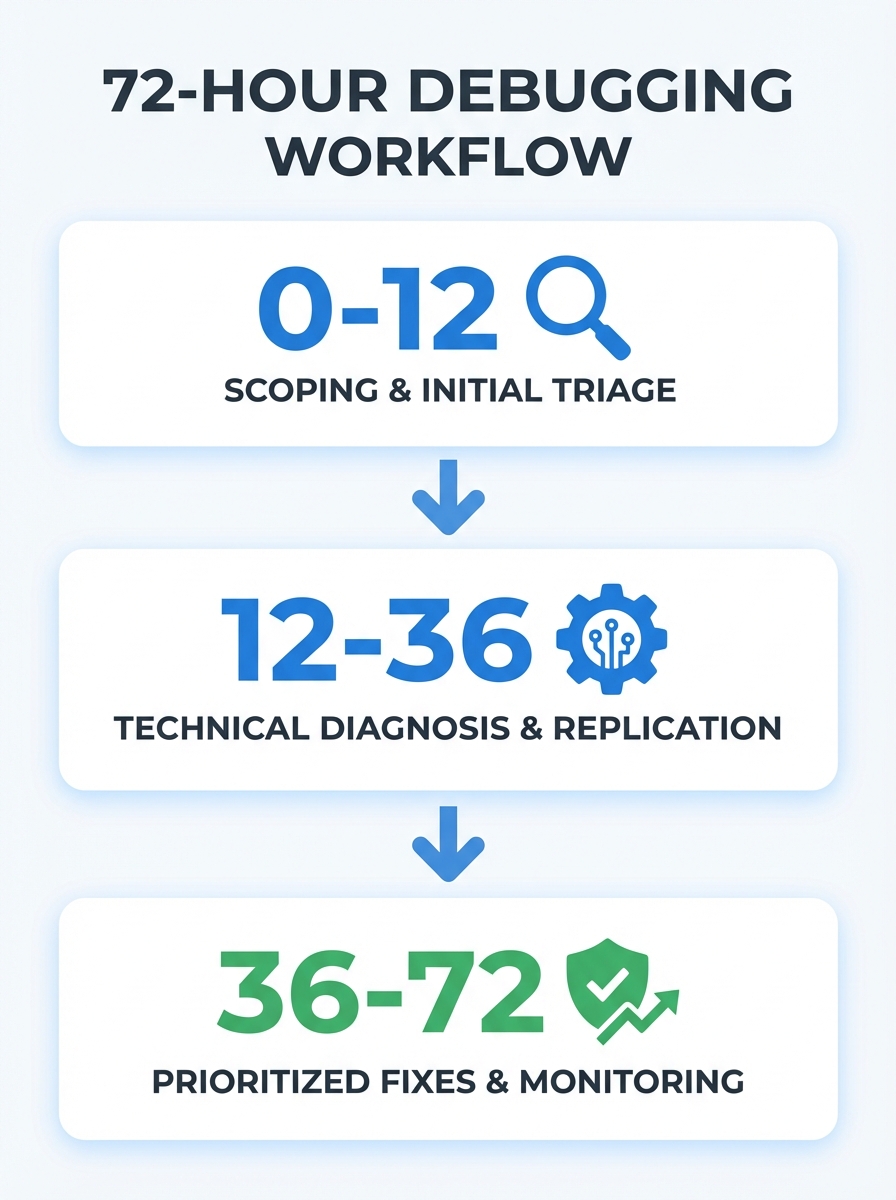
The SEO Debugging Workflow: A Systematic Approach to Diagnosing Visibility Drops in 72 Hours
Our best-performing product category lost 43% of its organic traffic on a Tuesday. By Thursday morning, I'd traced the cause to a single misplaced canonical tag that a developer had pushed during a routine CMS update. The fix took eleven seconds. Finding it took two days of structured investigation. That experience taught me something I now tell every team I work with: the technical SEO debugging process isn't about knowing every possible cause of a traffic drop. It's about having a repeatable system that eliminates causes in the right order so you don't waste 48 hours rewriting content when Google can't even crawl your pages.
This is the workflow I've refined over dozens of these fire drills. It fits inside 72 hours, it works whether you're dealing with a sitewide collapse or a localized section dip, and it will keep you from panicking your way into bad decisions.
Why 72 Hours Matters
Speed isn't just about optics or calming nervous stakeholders. Google's indexing systems have gotten faster, and ranking changes that once took weeks to settle now shift noticeably within 7 to 14 days. That means every day you spend guessing instead of diagnosing is a day your competitors are absorbing your traffic. And traffic loss compounds. A page that drops from position 6 to position 14 doesn't just lose clicks; it loses the engagement signals that helped it rank in the first place.
The 72-hour window isn't about fixing everything. It's about identifying the root cause with high confidence and deploying the highest-impact correction. Recovery takes weeks, but diagnosis shouldn't.
Confirm the Drop and Define Its Shape
Before you touch a single setting, you need to answer three questions. Get these wrong and you'll chase ghosts for the next 60 hours.
Is the drop real?
This sounds obvious, but I've seen teams burn entire sprints reacting to tool glitches. Third-party visibility scores can fluctuate based on their own crawl schedules and keyword sampling. Always confirm in Google Search Console first. Compare the last 28 days against the previous 28 days, and check year-over-year data if your business has any seasonal patterns. If GSC doesn't confirm the drop, your third-party tool might just be having a bad week.
What's the scope?
A sitewide drop and a section-specific drop are completely different problems. Filter your GSC data by URL path. Is it your blog, your product pages, your location pages? If the decline is concentrated in one section, you're almost certainly looking at a template-level issue or a content quality signal affecting a specific page type. If it's across the board, think bigger: domain authority, crawl access, or an algorithmic update.
Understanding how core updates affect site performance is especially important here, since Google's March 2026 update reshuffled rankings for a lot of sites and the symptoms can look identical to a technical failure.
Is it actually a traffic drop, or a SERP layout change?
Here's one that catches people off guard. If your impressions in GSC are stable but clicks have fallen, the problem might not be your site at all. New SERP features, expanded AI Overviews, or additional paid ad slots can push your organic result below the fold even when your ranking hasn't changed. Check whether the queries driving your traffic now trigger features that weren't there before.
The Debugging Pyramid
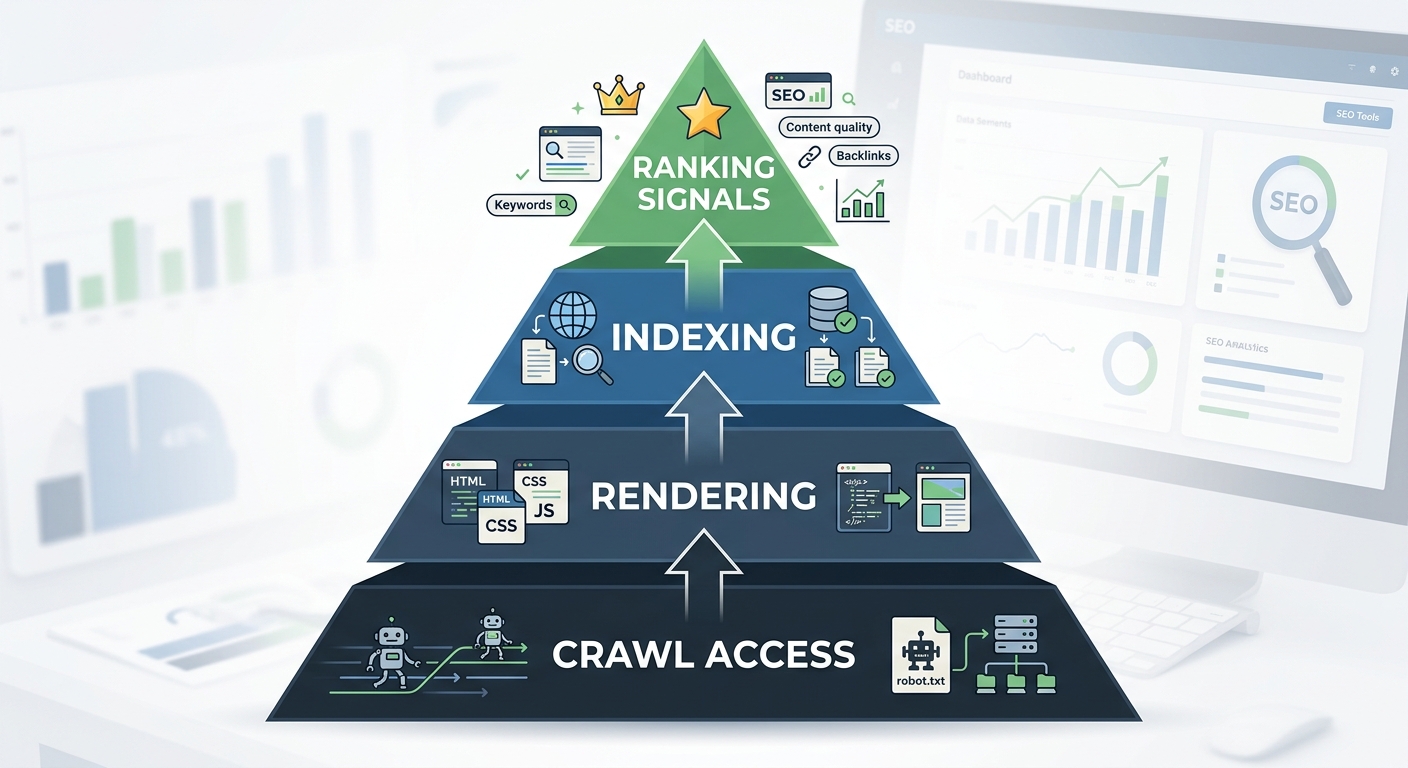
This is where most people go wrong. They jump straight to content, because content is visible and feels actionable. But as Search Engine Land's debugging framework emphasizes, you should work through technical issues in order of dependency: crawl, then render, then index, then rank. There's no point optimizing a page's title tag if Googlebot can't reach the page.
Layer 1: Can Google Access Your Pages?
Pull up your robots.txt file. Check for accidental disallow directives. I know this sounds basic, but a surprising number of visibility drops trace back to a staging robots.txt file that got deployed to production, or a plugin update that reset crawl directives.
Next, check the GSC Page Indexing report. Look for spikes in pages marked "Excluded" or "Discovered, not indexed." If you see a sudden wall of excluded URLs, something changed in how Google is evaluating your crawl permissions or your site's crawl budget allocation.
Then check your XML sitemap. Is it returning a 200 status? Does it contain the URLs you actually want indexed? Is it referencing old URL patterns from before a migration?
Layer 2: Can Google Render Your Pages?
JavaScript-heavy sites are particularly vulnerable here. If your content loads via client-side rendering and something breaks in the JS bundle, Googlebot might see a blank page while your users see everything fine. Google's own technical SEO documentation stresses that understanding the crawl-index-serving pipeline is essential, because if you don't grasp how rendering works, you'll struggle to debug issues when they arise.
Use GSC's URL Inspection tool to see the rendered HTML of your key pages. Compare what Googlebot sees against what a browser sees. If there are major differences, you've found your problem.
Layer 3: Are Your Pages Being Indexed Correctly?
Canonical tags are the silent killer. A misconfigured canonical can tell Google to ignore a page entirely, or worse, to consolidate a high-performing page's signals into a low-performing one. Check the "Google-selected canonical" field in URL Inspection. If it doesn't match the canonical you set, that's a problem worth investigating.
Also look for accidental noindex tags. A common culprit: staging environments where meta noindex is standard, and those tags persist after content is pushed to production.
Layer 4: Ranking Signal Evaluation
Only after you've confirmed that crawl access, rendering, and indexing are clean should you look at content and ranking signals. This is where you evaluate whether the content on affected pages still matches search intent, whether freshness signals are working against you, and whether competitors have simply produced better pages.
Audit your highest-traffic pages for visible dates that make content appear stale. Update articles with current statistics, fresh examples, and relevant context. A published date from 2023 on an article about "best practices for X" tells both users and search engines that the information might be outdated.
Prioritize and Deploy
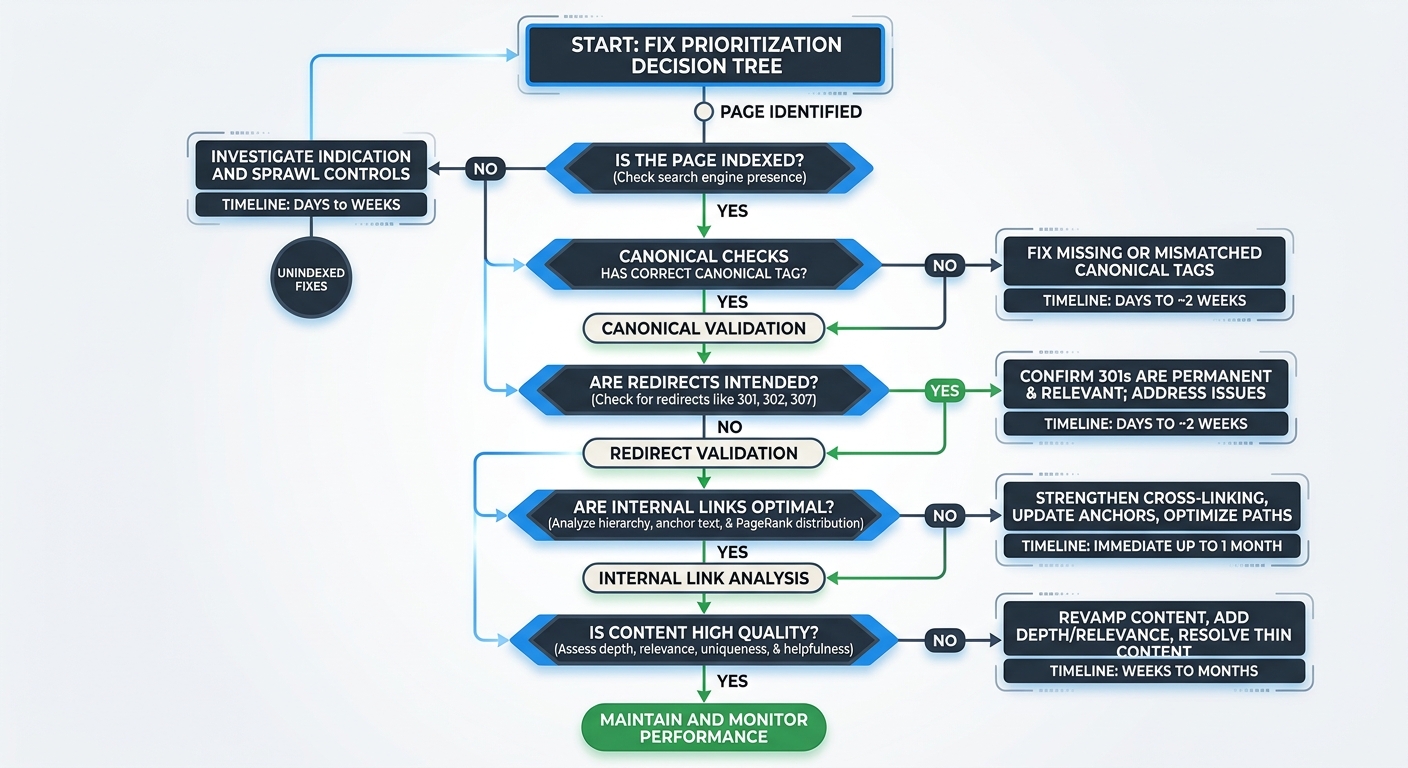
You've found the problem (or problems, since visibility drops often have compound causes). Now comes site audit prioritization, the process of deciding what to fix first for maximum recovery speed.
Here's the order I follow, every time:
Indexing blockers like noindex tags, robots.txt blocks, or broken canonical chains. These are binary: either Google can see your page or it can't. Fix these first.
Redirect and canonical issues where link equity is being lost or misdirected. A redirect chain that's four hops deep is bleeding authority at every jump.
Internal linking gaps where important pages have fewer than three internal links pointing to them. These pages are effectively orphaned, and Google treats them as low-priority.
Content alignment and freshness for pages where the technical foundation is sound but the content no longer matches what searchers want.
This priority order is critical. According to Bipper Media's ranking recovery methodology, you should always confirm indexing, canonical selection, and internal linking before rewriting content. Rewriting prematurely wastes time when the real issue might be purely technical.
For sites dealing with compound technical issues, the effects are multiplicative, not additive. A site with schema gaps, weak internal linking, and crawl waste can lose 30 to 50 keyword positions across its portfolio. Fix the crawl waste and suddenly the other issues become less severe because Google is actually processing your pages again.
If you're evaluating whether to handle this process internally or bring in help, understanding the real cost difference between tools and agency support can help you make a smarter call based on the severity of the drop.
Monitor, Document, and Set Tripwires
The final phase isn't glamorous, but it's what separates teams that keep recovering from the same problems over and over from teams that fix things permanently.
Set Up Automated Monitoring
Connect GSC data to whatever alerting system your team uses. You want notifications when indexed page count drops by more than 5%, when crawl errors spike above baseline, or when average position shifts significantly for your top 20 pages. These tripwires catch the next problem before it becomes a crisis.
Track Recovery on the Right Timeline
Don't expect rankings to bounce back in 72 hours. Expect this:
Crawl efficiency improvements show up in 3 to 7 days
Indexation recovery takes 7 to 14 days
Ranking movement takes 14 to 30 days, especially for pages that were sitting in positions 11 through 30
According to a Moving Traffic Media analysis, diagnosing and resolving SEO traffic drops requires a systematic approach that considers multiple potential causes and addresses them methodically. The 72-hour window handles the diagnosis and first fix. Full recovery is a 4 to 6 week process.
Document Every Change
This one's personal. I've been burned by failing to document fixes and then being unable to correlate a recovery (or a second drop) with a specific change. Record what you changed, when you changed it, and what metric you expect to move. When your traffic recovers three weeks later, you'll know exactly what worked.
For teams navigating post-update recovery specifically, there's a more detailed breakdown of how to balance technical SEO and content quality decisions during those critical weeks.
The Keyword Visibility Angle Most People Miss
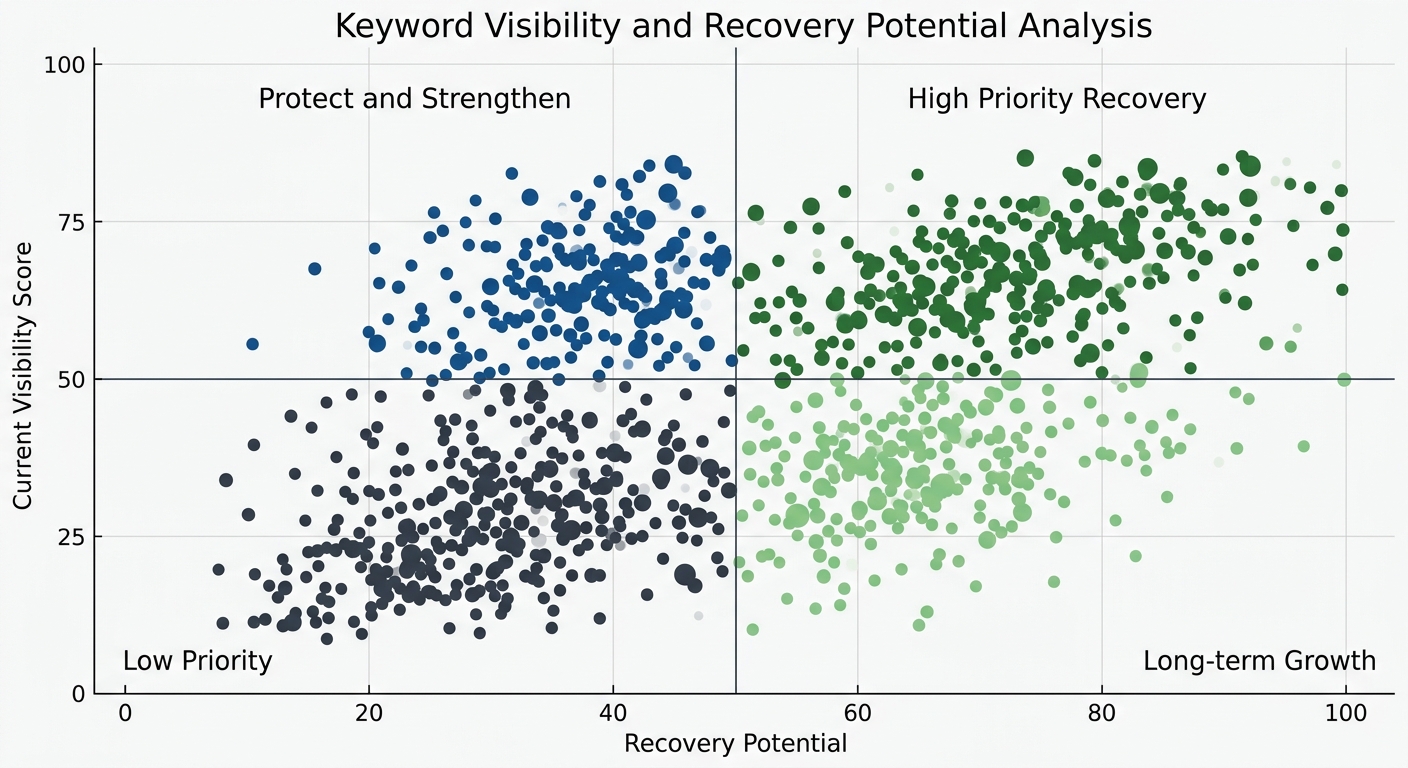
Once you've stabilized the technical foundation, there's an underrated optimization move. Pull your keyword visibility data and look for asymmetry. As Localo's visibility research points out, if one keyword has a much higher visibility score than others, you can focus optimization on that keyword for immediate impact while targeting lower-visibility terms for longer-term growth.
This is especially useful during recovery because you want to protect and strengthen the pages that are still performing while you rebuild the ones that dropped. Spreading effort evenly across all keywords is a common mistake during a ranking recovery methodology execution. Concentrate resources where they'll compound fastest.
Limitations of This Workflow
I want to be honest about the limits. This workflow is designed for diagnosable, technical, or structural causes of visibility loss. It won't save you if your content is fundamentally outclassed by competitors, if your backlink profile just lost a major referring domain, or if Google made an algorithmic decision that your site type is less relevant for certain queries.
And it won't replace judgment. Every step in this process involves decisions that require context about your specific site, your business, and your competitive landscape. The Moz team makes a great point in their checklist for debugging strange technical SEO problems: you'll occasionally face issues with no straightforward solution, and the key is having a system that keeps you from wasting time on unimportant rabbit holes.
But for the majority of visibility drops I've investigated, the cause was something detectable within 72 hours, something fixable within a week, and something preventable with better monitoring. The workflow works because it forces you to check the foundation before redecorating the living room. Start at crawl. Work your way up. Fix in order of dependency. And document everything so the next fire drill goes faster than this one.
That's the whole system. Print it out, pin it to your wall, and hope you don't need it. But when you do, you'll be glad it's there.
Marcus Webb
Digital marketing consultant and agency review specialist. With 12 years in the SEO industry, Marcus has worked with agencies of all sizes and brings an insider perspective to agency evaluations and selection strategies.
Frequently Asked Questions
- How long does it take to diagnose an SEO traffic drop?
- A systematic SEO debugging workflow can identify the root cause of a traffic drop within 72 hours. The diagnosis phase typically takes 36-60 hours, followed by monitoring and documentation in the final 12 hours.
- What are the four layers of technical SEO debugging?
- The debugging pyramid consists of: Layer 1 (crawl access), Layer 2 (rendering), Layer 3 (indexing), and Layer 4 (ranking signals). You should work through these in order of dependency, checking crawl permissions and robots.txt before evaluating content quality.
- What causes canonical tag problems in SEO?
- Misconfigured canonical tags can tell Google to ignore a page entirely or consolidate a high-performing page's signals into a low-performing one. Common issues include canonical tags not matching what Google selects, or accidental canonical redirects set during CMS updates.
- How do I confirm if an SEO traffic drop is real?
- Always verify drops in Google Search Console first by comparing the last 28 days against the previous 28 days and checking year-over-year data. Third-party visibility tools can fluctuate based on their own crawl schedules, so GSC is the authoritative source.
- What's the priority order for fixing SEO visibility problems?
- Fix in this order: indexing blockers (noindex, robots.txt blocks), redirect and canonical issues, internal linking gaps, then content alignment and freshness. This prevents wasting time on content rewrites when the real issue is technical.
- How long does SEO recovery take after fixing a visibility drop?
- Crawl efficiency improvements appear in 3-7 days, indexation recovery takes 7-14 days, and ranking movement takes 14-30 days, especially for pages in positions 11-30. Full recovery is typically a 4-6 week process.
- What should I check if my SEO impressions are stable but clicks dropped?
- The problem might be a SERP layout change, not your site. Check whether the queries driving your traffic now trigger new SERP features, expanded AI Overviews, or additional paid ad slots that push your organic result below the fold.
- How do I know if a traffic drop is sitewide or section-specific?
- Filter your Google Search Console data by URL path to determine scope. A concentrated decline in one section (blog, product pages, location pages) suggests a template-level issue, while sitewide drops indicate domain authority, crawl access, or algorithmic update problems.
Explore more topics